5.5.1. 登录瞻博设备web界面
进入图形化配置界面,通过http://ip地址
5.5.2. 找到snmp配置项
主菜单——configuration——Report Setting——snmp
5.5.3. 配置snmp常规信息
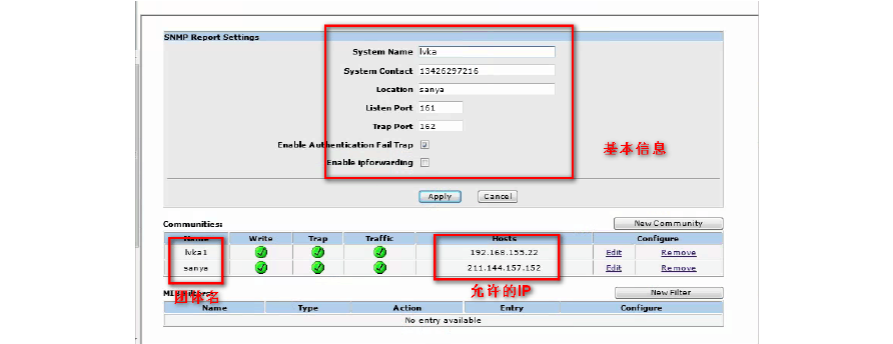
在System Contact框中填写系统管理员的联系方式,比如姓名等 在location处填写此设备的使用地点。勾选“Enable Authentication Fail Trap”复选框,不改变默认端口。点击“Apply”应用配置
5.5.4. 添加snmp团体字
点击new community填加community 字符串。 产品默认为public,建议更改。 同时选择“Trap”、“Including Traffic Alarms”两个复选框。 在“Hosts IP Address/Netmask”中填加管理主机的ip(乐维server服务器)地址和子网掩码。 点击”ok“按钮保存
5.5.5. 配置SNMP网管接口
这一部分很重要,不能忽略 在配置完SNMP协议后,还需给设备配置一个可网管接口IP,监控平台通过该接口IP和设备通信。 “Network“——“Interfaces”——打开所有的接口配置。 选择要作为管理的接口,点击“Edit”,打开该接口的属性编辑框 在“Management Service”中选择“snmp”。 点击ok,确定即可。
5.5.6. SNMP测试
在监控平台server终端执行如下命令
Last modified on August 11, 2026