> ## Documentation Index
> Fetch the complete documentation index at: https://doc.lwops.cn/llms.txt
> Use this file to discover all available pages before exploring further.
# For Rocky8/Redhat8/AnolisOS8
### 1.安装操作步骤
#### 1.1.前提条件
* 操作系统环境
* 系统: Rocky8 / Redhat8 / AnolisOS8的操作系统
* 内存: 16GB
* CPU: 16核
* 磁盘: /data目录所在分区300GB以上容量
* 部署包文件名:[Platform\_Setup\_Rocky\_Green\_Obsidian\_8.2\_x86\_64\_zh\_CN.tar.gz](https://forum.lwops.cn/release/download/p/zGyiuH80cT1gxXDd)
* 安装操作需要使用操作系统root用户执行。
* 注意事项:资产管理的后端数据库mongo,出于漏洞安全等考量,全部部署包内置7.0+版本,但是mongo 7.0+版本对CPU指令集有要求。
如果部署过程有遇到安装中止问题,可以考虑以下几种思路:
1.如果在深信服超融合平台部署,需要开启虚拟机的CPU直通(配置开启后重启虚机生效)
2.如果是服务器CPU较老旧,需要换较新的服务器部署,或者联系乐维技术获取支持,安装4.2版本mongo(存在漏洞风险)
#### 1.2.基础环境安装
1.任意路径解压安装包
```plain theme={null}
[root@LW ~]# Platform_Setup_Rocky_Green_Obsidian_8.2_x86_64_zh_CN.tar.gz -C /home
[root@LW ~]# cd /home/Platform_Setup
```
2.执行脚本
```plain theme={null}
[root@LW Platform_Setup]# bash install.sh
```
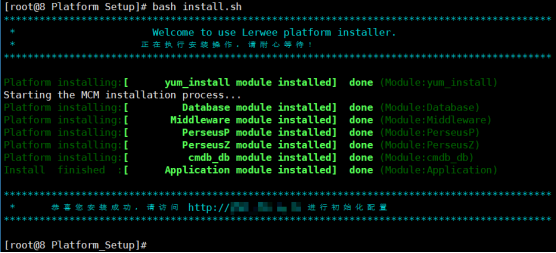
确保系统资源充足,正常资源充足情况则进入安装流程,等待进度条跑完则安装成功
### 2.Web登录及初始化
1.使用谷歌浏览器80及以上版本输入IP:[http://X.X.X.X后回车访问](http://X.X.X.X后回车访问)
2.第一步:开始【环境检测】,系统环境检测通过后,进行【数据库配置】。
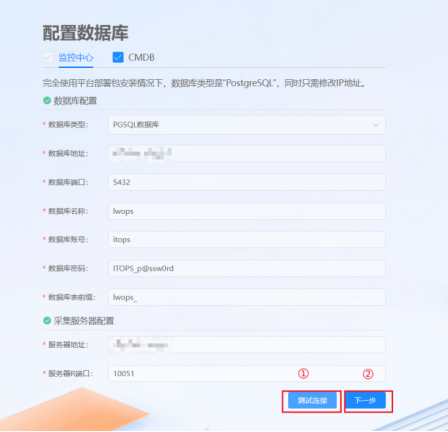
3.第二步:配置数据库,默认不用修改信息;测试通过后,点击下一步安装初始化。
4.第三步:点击”安装初始化”,初始化安装过程大致需要几分钟,安装过程勿关闭界面。

5.第四步:点击“完成”,可立即体验系统。

默认登录账号 Admin 密码 ITIM\_p\@ssw0rd
6.技术支持群二维码(乐乐微信:lerwee)