> ## Documentation Index
> Fetch the complete documentation index at: https://doc.lwops.cn/llms.txt
> Use this file to discover all available pages before exploring further.
# 探测
操作视频:[探测监控教程](\[https://forum.lwops.cn/videos?video_id=13\&page=1]\(https://forum.lwops.cn/videos?video_id=13\&page=1\))
## 1.概述
本文档为乐维运维智能体平台的探测功能,支持配置WEB、Ping、UDP、TCP、Traceroute五类探测监控对象,实现网站连通性、网络设备可达性、端口可用性及路由链路的实时监控。
## 2.WEB
### 2.1.功能说明
用于监控 HTTP/HTTPS 网站、API 接口的连通性、响应状态码与响应时间,判断网站是否正常对外提供服务。
### 2.2.配置步骤
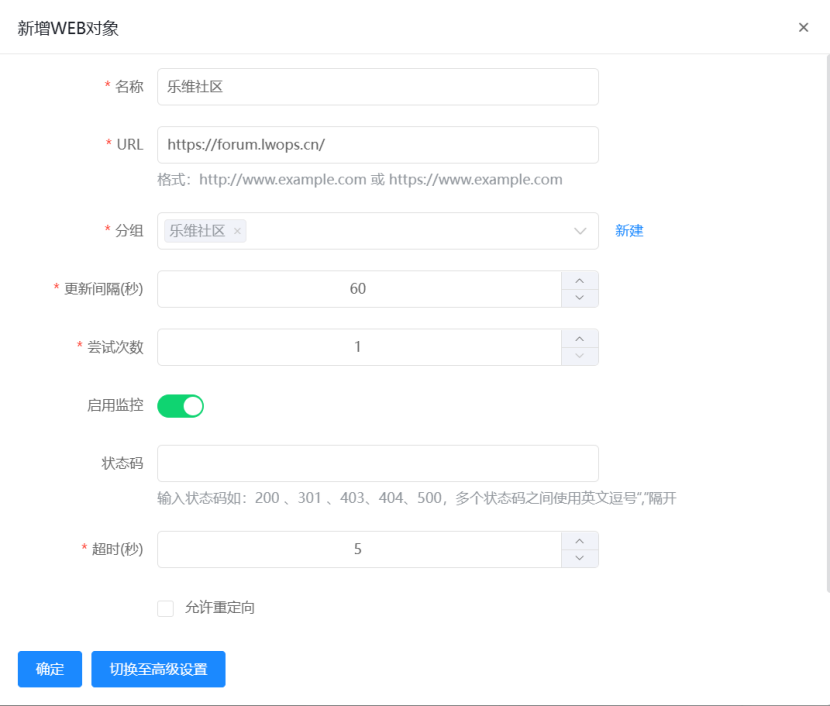
进入监控中心,资源列表中的探测功能WEB中,点击新建根据提示完成信息填写。 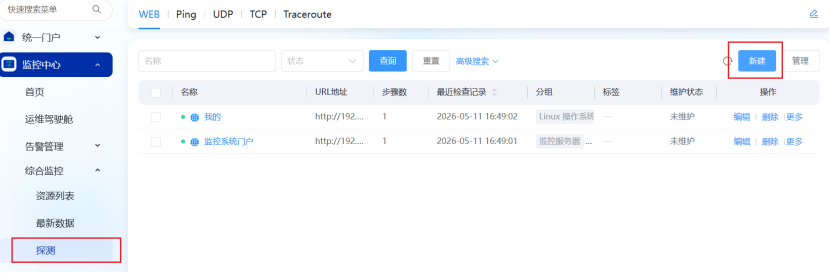 根据页面提示填写,名称可自定义,URL可写域名或IP,分组,更新间隔,尝试次数可自行根据需要调整
  ## 3.Ping
### 3.1.功能说明
通过 ICMP 协议 Ping 目标主机 / 设备,监控其网络连通性、丢包率与响应延迟,快速判断设备是否在线。
### 3.2.配置步骤
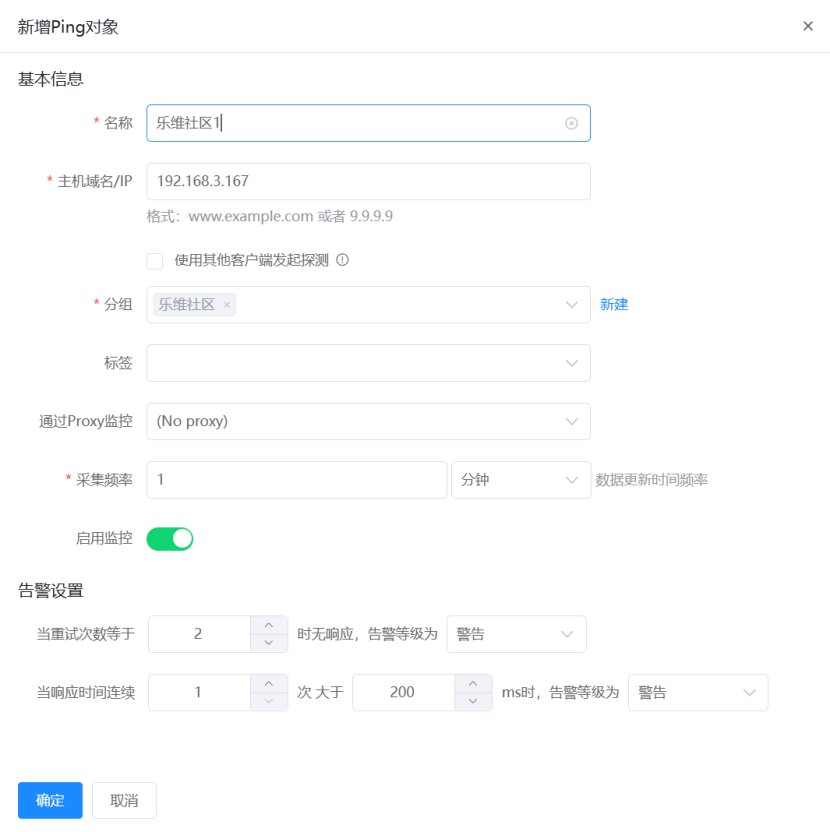
进入监控中心,资源列表中的探测功能Ping中,点击新建根据提示完成信息填写。
## 3.Ping
### 3.1.功能说明
通过 ICMP 协议 Ping 目标主机 / 设备,监控其网络连通性、丢包率与响应延迟,快速判断设备是否在线。
### 3.2.配置步骤
进入监控中心,资源列表中的探测功能Ping中,点击新建根据提示完成信息填写。 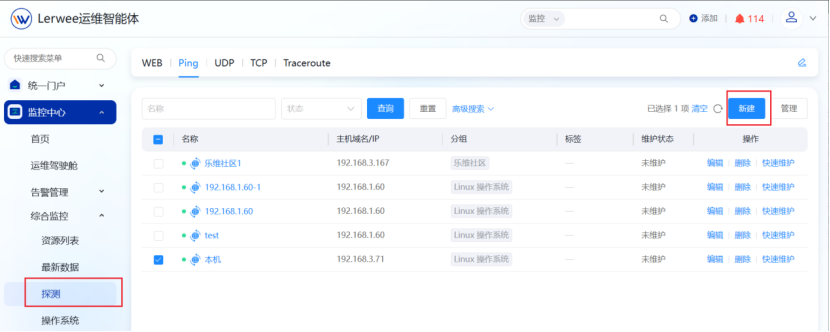 根据页面提示填写,名称可自定义,URL可写域名或IP,分组,更新间隔,尝试次数可自行根据需要调整
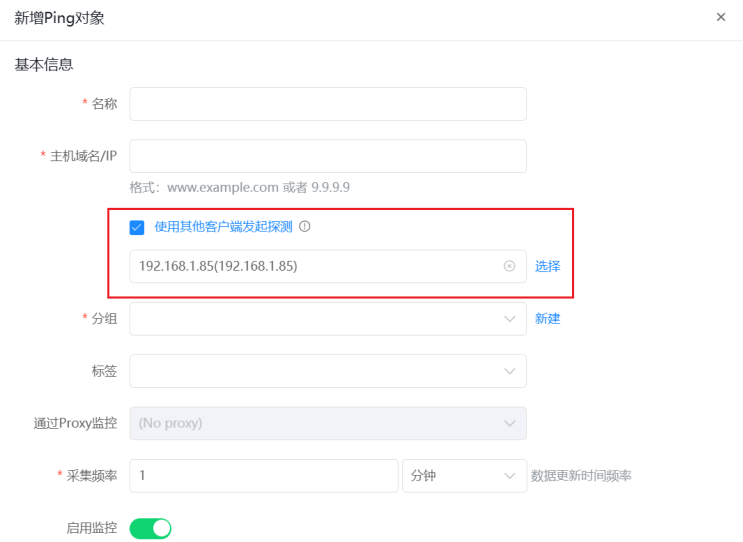
  还可以使用客户端发起探测指定由某一台机器发起探测
  ## 4.UDP
### 4.1.功能说明
监控目标主机的 UDP 端口是否正常开放,适用于 DNS、NTP 等 UDP 协议服务的可用性检查。
### 4.2.配置步骤
进入监控中心,资源列表中的探测功能UDP中,点击新建根据提示完成信息填写。
## 4.UDP
### 4.1.功能说明
监控目标主机的 UDP 端口是否正常开放,适用于 DNS、NTP 等 UDP 协议服务的可用性检查。
### 4.2.配置步骤
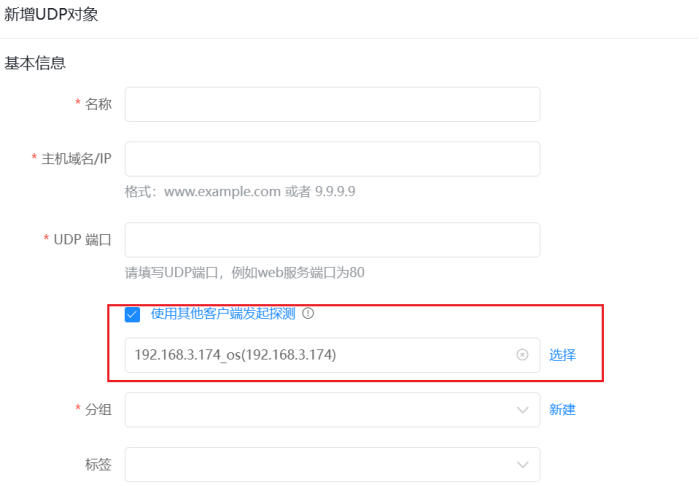
进入监控中心,资源列表中的探测功能UDP中,点击新建根据提示完成信息填写。 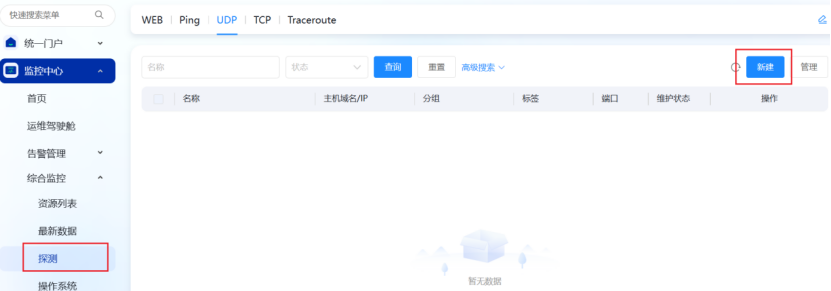 根据页面提示填写,名称可自定义,URL可写域名或IP,端口,分组,更新间隔,尝试次数可自行根据需要调整
 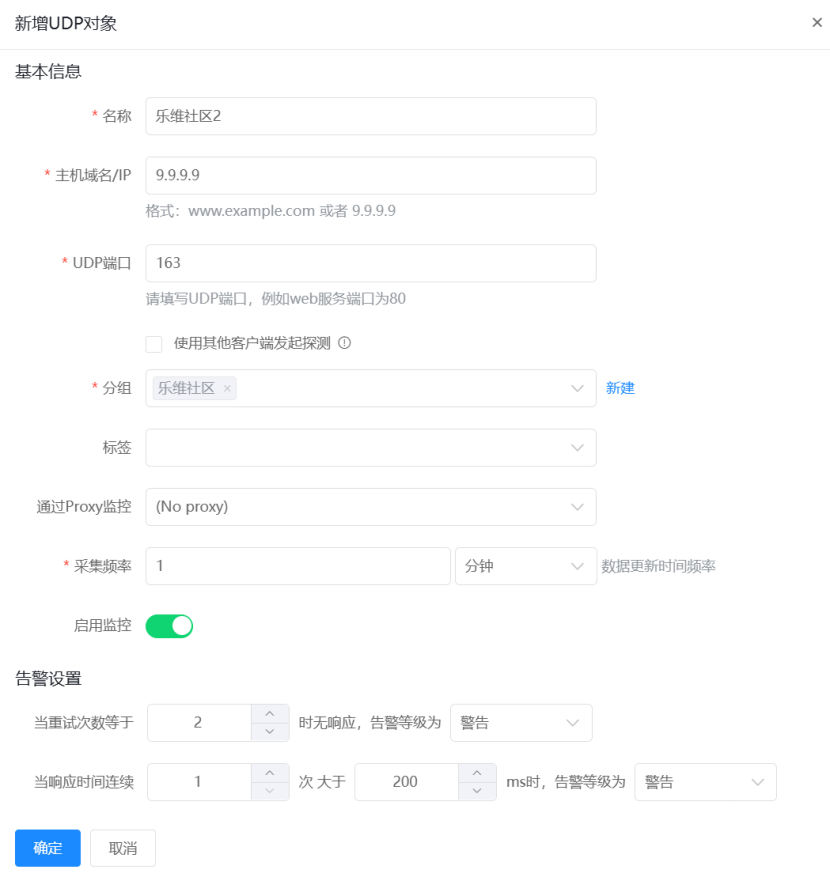 还可以使用客户端发起探测指定由某一台机器发起探测
  ## 5.TCP
### 5.1.功能说明
进入监控中心,资源列表中的探测功能TCP中,点击新建根据提示完成信息填写。
## 5.TCP
### 5.1.功能说明
进入监控中心,资源列表中的探测功能TCP中,点击新建根据提示完成信息填写。 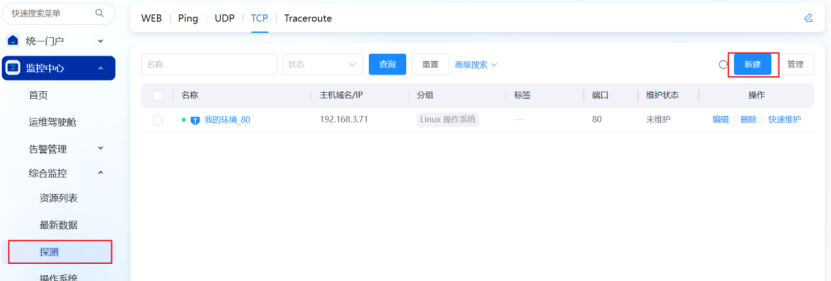 ### 5.2.配置步骤
根据页面提示填写,名称可自定义,URL可写域名或IP,端口,分组,更新间隔,尝试次数可自行根据需要调整
### 5.2.配置步骤
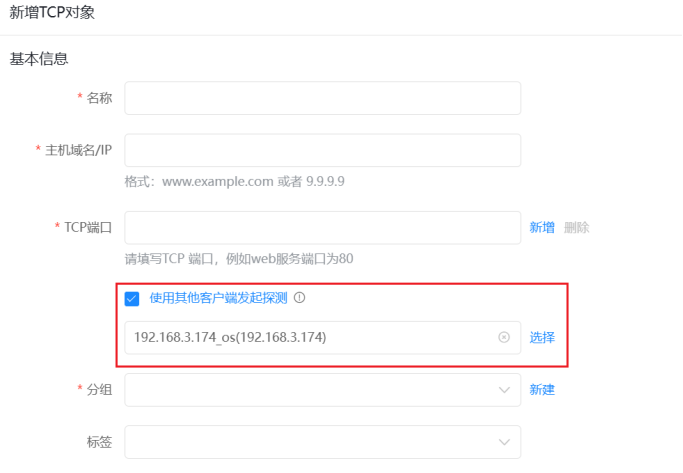
根据页面提示填写,名称可自定义,URL可写域名或IP,端口,分组,更新间隔,尝试次数可自行根据需要调整 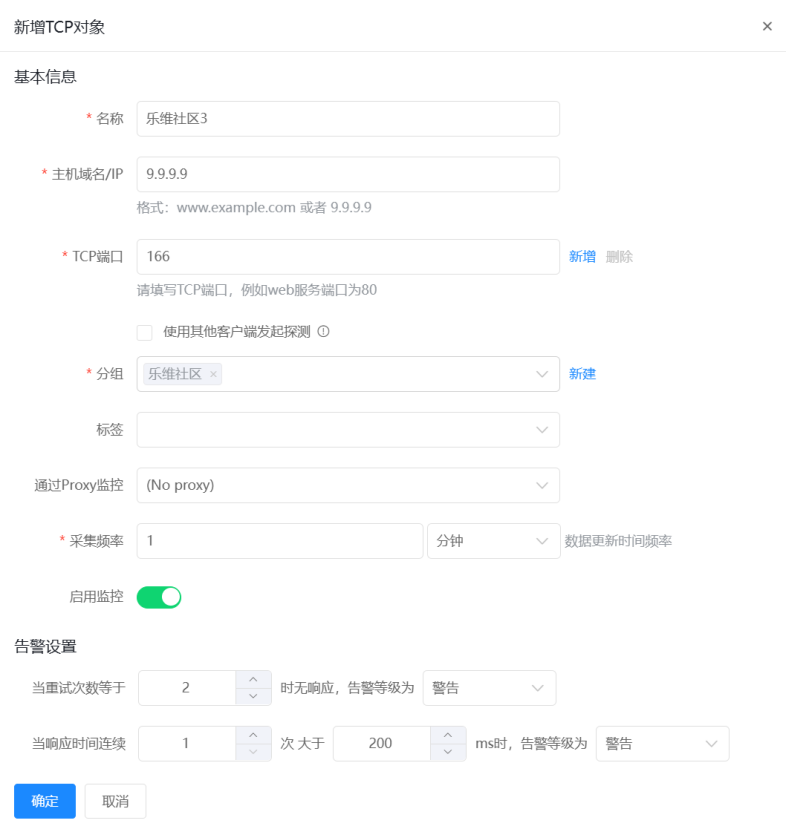 还可以使用客户端发起探测指定由某一台机器发起探测
  ## 6.Traceroute
### 6.1.功能说明
进入监控中心,资源列表中的探测功能Traceroute中,点击新建根据提示完成信息填写。
## 6.Traceroute
### 6.1.功能说明
进入监控中心,资源列表中的探测功能Traceroute中,点击新建根据提示完成信息填写。 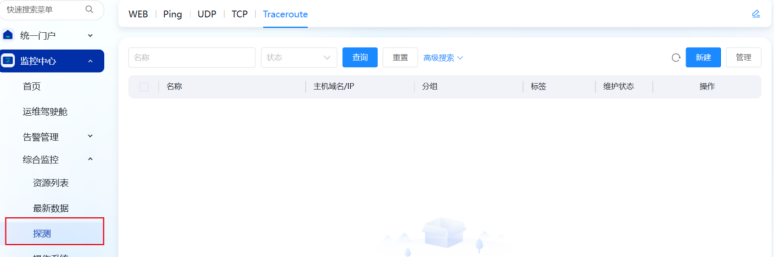 ### 6.2.配置步骤
根据页面提示填写,名称可自定义,URL可写域名或IP,分组,更新间隔,尝试次数可自行根据需要调整
### 6.2.配置步骤
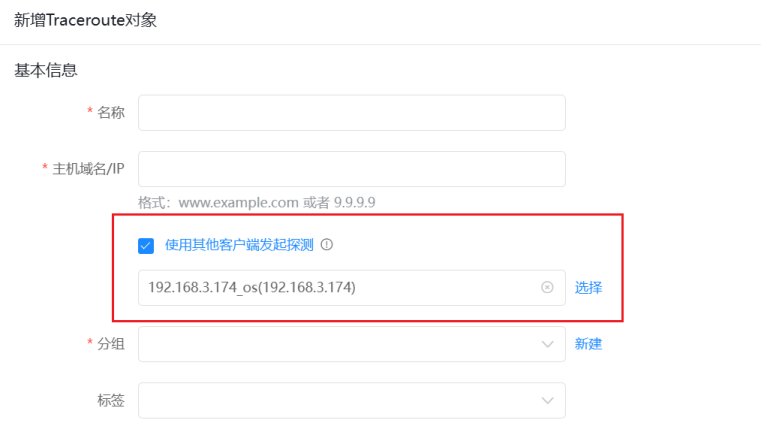
根据页面提示填写,名称可自定义,URL可写域名或IP,分组,更新间隔,尝试次数可自行根据需要调整 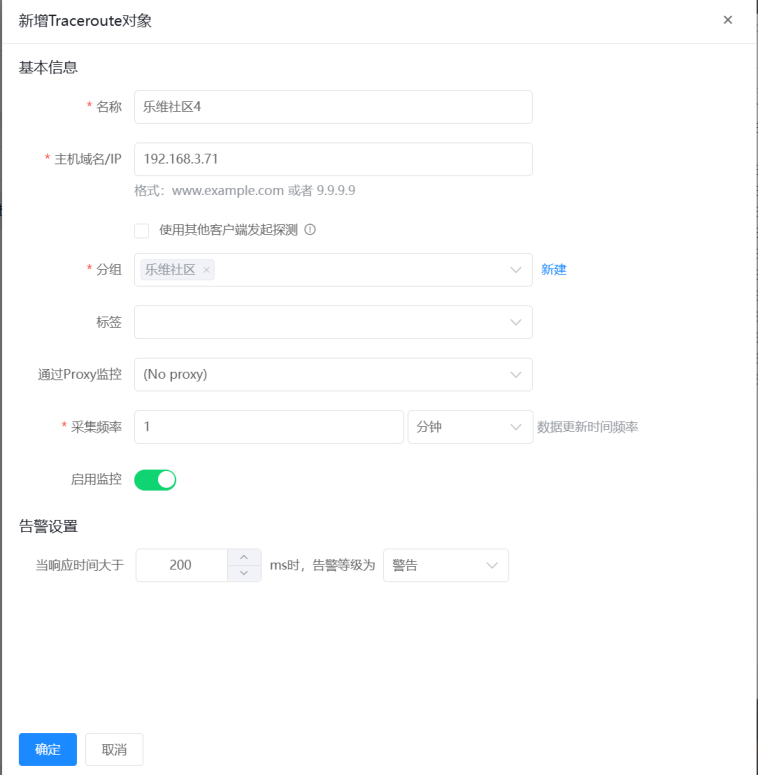 还可以使用客户端发起探测指定由某一台机器发起探测