> ## Documentation Index
> Fetch the complete documentation index at: https://doc.lwops.cn/llms.txt
> Use this file to discover all available pages before exploring further.
# 告警集成
操作视频:[告警集成](https://forum.lwops.cn/videos?video_id=49\&page=1)
## 对接的整体步骤
① 拿 4 个资源(乐维端提供)
② 在你的系统写代码调接口
③ 推送告警到乐维
④ 在乐维平台验证推送成功
## 操作步骤
### 获取4 个对接资源
| **名称** | **是什么** |
| -------- | -------- |
| LwReqUrl | 接口基础地址 |
| apikey | API 签名密钥 |
| appid | 应用 ID |
| token | 应用密钥 |
### LwReqUrl
一般为[http://页面地址/backend\_api](http://页面地址/backend_api)
例如: [http://192.168.1.11/backend\_api/api/v6/aialert/receive](http://192.168.1.11/backend_api/api/v6/aialert/receive)
### apikey
在乐维服务器执行:
```bash theme={null}
cat /itops/nginx/html/lwjk_app/.env | grep API_SECRET_KEY
```
输出类似:
```text theme={null}
API_SECRET_KEY=YOUR_API_KEY
```
将实际密钥填写到 Postman 环境变量 `apikey`。示例中的占位符不能直接作为密钥使用,请勿公开真实密钥。
#### appid 和token
在乐维平台 Web端操作:
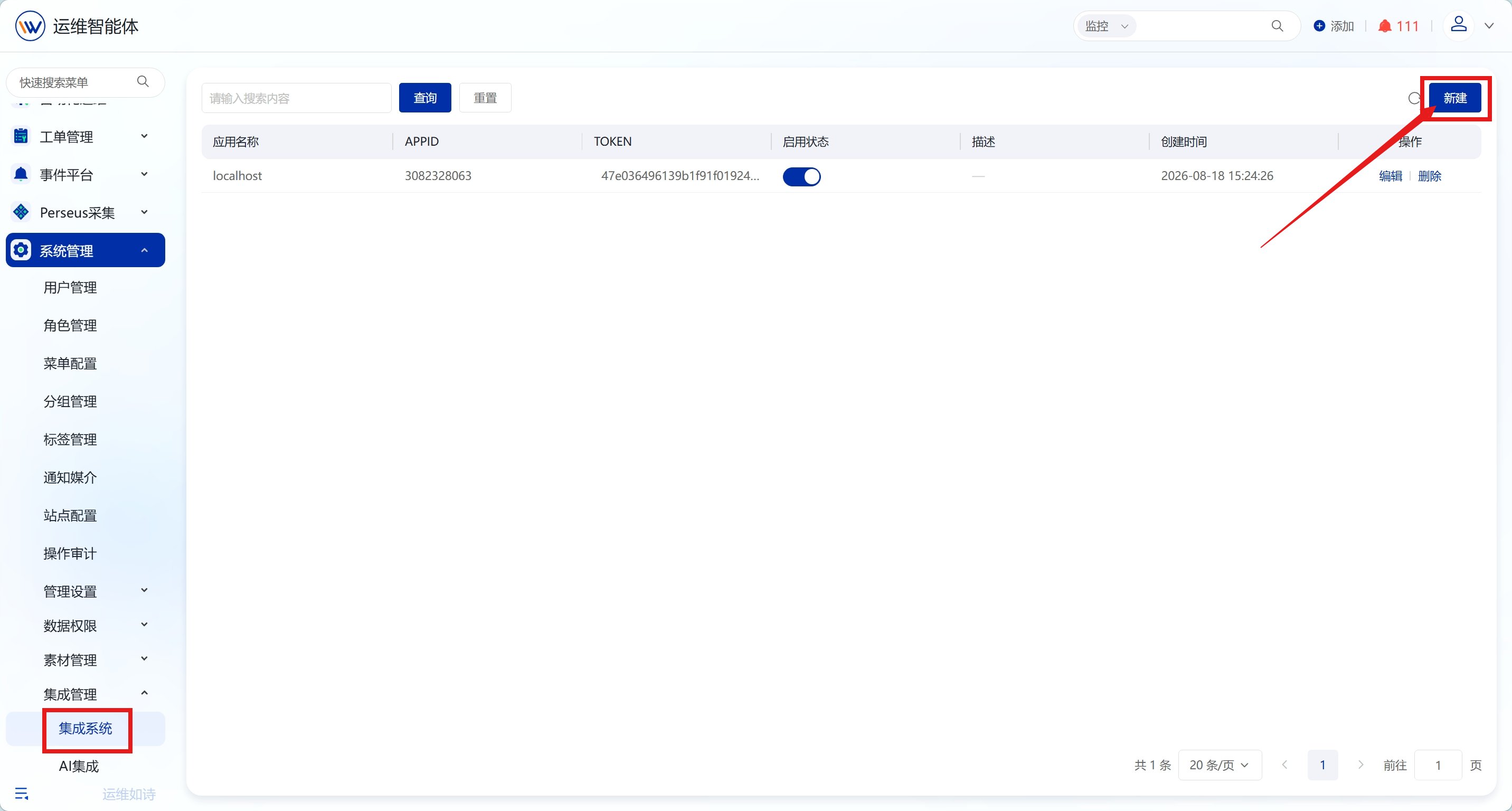
1. 登录乐维平台,进入 系统管理 → 集成系统,点击 新增应用
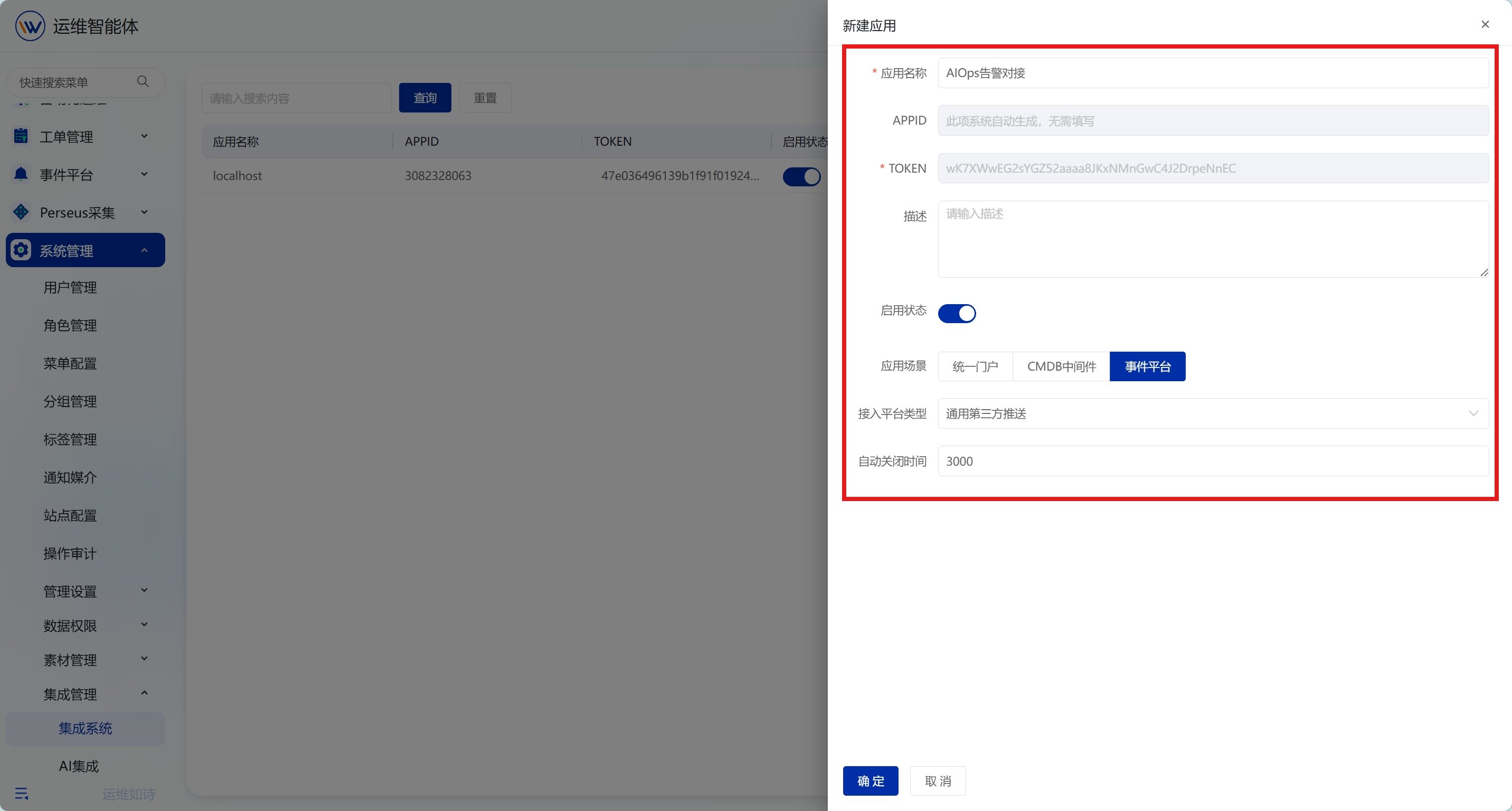
 2. 填写:
\- 应用名称:你的系统名(如"AIOps告警对接")
\- 应场景:事件平台
\- 接入平台类型:通过第三方推送
2. 填写:
\- 应用名称:你的系统名(如"AIOps告警对接")
\- 应场景:事件平台
\- 接入平台类型:通过第三方推送
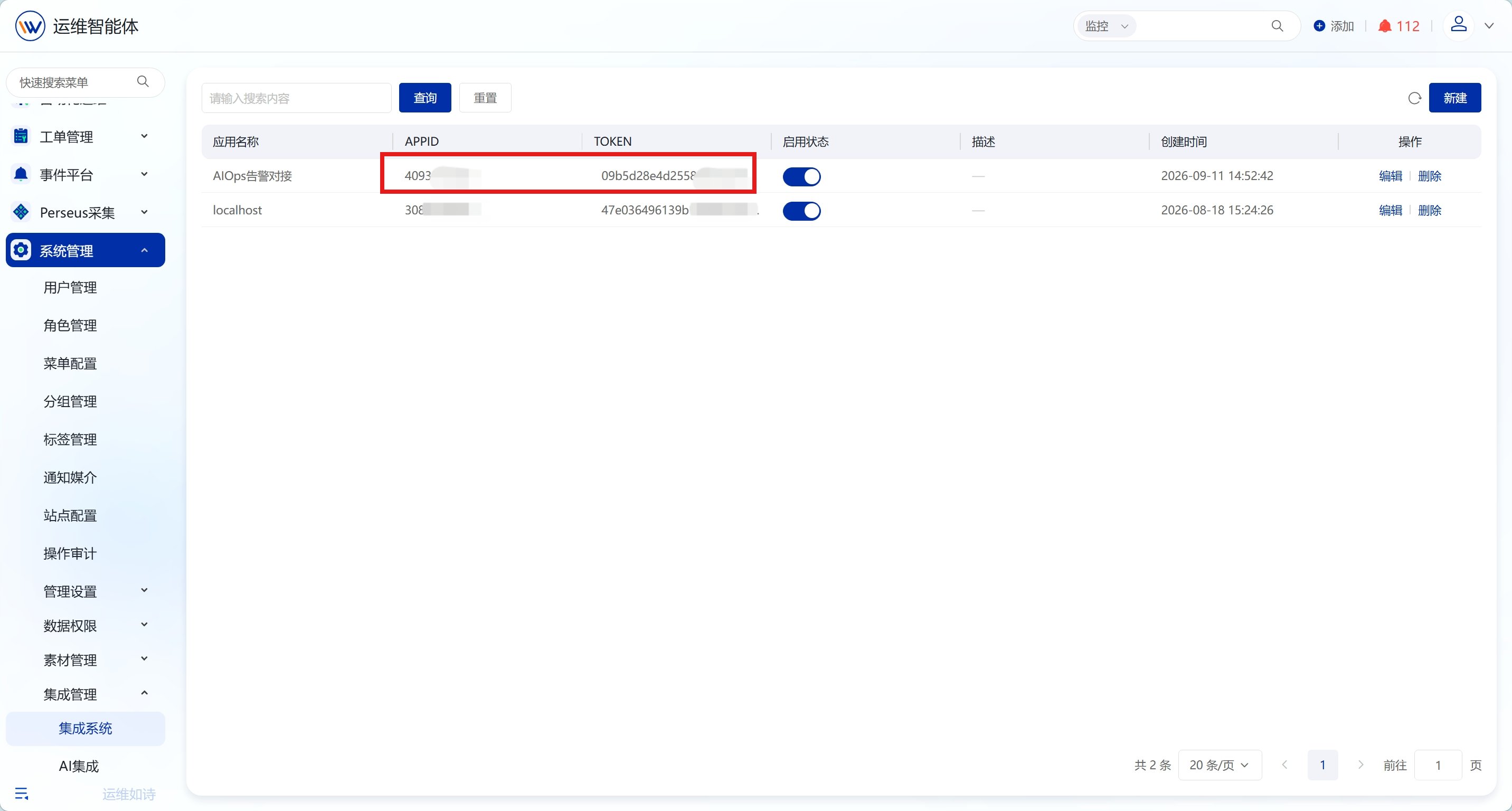
 3. 保存后系统生成 appid 和 token
 ### 用 Postman 测试
#### 步骤 1:导入 postman
把 “事件平台推送postman\_collection.json ”导入 Postman。
展开下方示例,复制 JSON 并保存为 `event-alert-integration.postman_collection.json`,然后导入 Postman。无需登录文档仓库。
```json theme={null}
{
"info": {
"name": "事件平台告警接收与恢复(脱敏示例)",
"schema": "https://schema.getpostman.com/json/collection/v2.1.0/collection.json"
},
"item": [
{
"name": "开放接口-告警接收",
"event": [
{
"listen": "prerequest",
"script": {
"exec": [
"",
"const apiKey = pm.environment.get('apikey');",
"let raw = pm.variables.replaceIn(pm.request.body.raw) ",
"const timestamp = Math.floor(Date.now() / 1000)",
"raw = raw.replace(\"{{timestamp}}\",timestamp)",
"const params = JSON.parse(raw);",
"",
"params.timestamp = timestamp",
"",
"// 将JSON参数按字典序排序并加上时间戳",
"const sortedParams = Object.keys(params).sort().reduce((acc, key) => {",
" if(key=='sign'){",
" return acc;",
" }",
" acc[key] = params[key];",
" return acc;",
"}, {});",
"",
"// 将参数按key+value连接",
"const joinedParams = Object.keys(sortedParams).map(key => `${key}${sortedParams[key]}`).join(\"\");",
"",
"// 加上自定义字符",
"const stringToSign = apiKey +joinedParams;",
"// 计算SHA1加签",
"const sign = CryptoJS.SHA1(stringToSign).toString(CryptoJS.enc.Hex);",
"",
"pm.environment.set(\"timestamp\", timestamp);",
"pm.environment.set(\"sign\", sign);"
],
"type": "text/javascript"
}
}
],
"request": {
"auth": {
"type": "noauth"
},
"method": "POST",
"header": [],
"body": {
"mode": "raw",
"raw": "{\n \"data\": \"{\\\"appid\\\":\\\"{{appid}}\\\",\\\"token\\\":\\\"{{token}}\\\",\\\"event_id\\\":553834,\\\"event_time\\\":1680745801,\\\"level\\\":4,\\\"title\\\":\\\"[操作系统]监控系统-Server 物理内存使用率持续10分钟大于20% -sdfsfjd \\\",\\\"ip\\\":\\\"127.0.0.1\\\",\\\"description\\\":\\\"自身监控中心使用\\\",\\\"object\\\":\\\"监控系统-Server\\\",\\\"object_type\\\":\\\"操作系统\\\",\\\"object_group\\\":\\\"os\\\",\\\"object_tag\\\":\\\"操作系统tag\\\"}\",\n \"timestamp\": \"{{timestamp}}\",\n \"sign\": \"{{sign}}\"\n}",
"options": {
"raw": {
"language": "json"
}
}
},
"url": {
"raw": "{{LwReqUrl}}/api/v6/aialert/receive",
"host": [
"{{LwReqUrl}}"
],
"path": [
"api",
"v6",
"aialert",
"receive"
]
}
},
"response": []
},
{
"name": "开放接口-告警恢复",
"event": [
{
"listen": "prerequest",
"script": {
"exec": [
"",
"const apiKey = pm.environment.get('apikey');",
"let raw = pm.variables.replaceIn(pm.request.body.raw) ",
"const timestamp = Math.floor(Date.now() / 1000)",
"raw = raw.replace(\"{{timestamp}}\",timestamp)",
"const params = JSON.parse(raw);",
"",
"params.timestamp = timestamp",
"",
"// 将JSON参数按字典序排序并加上时间戳",
"const sortedParams = Object.keys(params).sort().reduce((acc, key) => {",
" if(key=='sign'){",
" return acc;",
" }",
" acc[key] = params[key];",
" return acc;",
"}, {});",
"",
"// 将参数按key+value连接",
"const joinedParams = Object.keys(sortedParams).map(key => `${key}${sortedParams[key]}`).join(\"\");",
"",
"// 加上自定义字符",
"const stringToSign = apiKey +joinedParams;",
"// 计算SHA1加签",
"const sign = CryptoJS.SHA1(stringToSign).toString(CryptoJS.enc.Hex);",
"",
"pm.environment.set(\"timestamp\", timestamp);",
"pm.environment.set(\"sign\", sign);"
],
"type": "text/javascript"
}
}
],
"request": {
"auth": {
"type": "noauth"
},
"method": "POST",
"header": [],
"body": {
"mode": "raw",
"raw": "{\n \"data\": \"{\\\"appid\\\":\\\"{{appid}}\\\",\\\"token\\\":\\\"{{token}}\\\",\\\"event_id\\\":553834,\\\"recovery_time\\\":1680745901}\",\n \"timestamp\": \"{{timestamp}}\",\n \"sign\": \"{{sign}}\"\n}",
"options": {
"raw": {
"language": "json"
}
}
},
"url": {
"raw": "{{LwReqUrl}}/api/v6/aialert/recovery",
"host": [
"{{LwReqUrl}}"
],
"path": [
"api",
"v6",
"aialert",
"recovery"
]
}
},
"response": []
}
],
"variable": [
{
"key": "LwReqUrl",
"value": "https://YOUR_LERWEE_HOST/backend_api"
},
{
"key": "appid",
"value": "YOUR_APP_ID"
},
{
"key": "token",
"value": "YOUR_APP_TOKEN"
}
]
}
```
#### 步骤 2:填变量
替换 collection 里的占位符:
* LwReqUrl = [http://192.168.3.91/backend\_api](http://192.168.3.91/backend_api)
* appid = 你的 appid
* token = 你的 token
配置环境变量 `apikey` 为实际 API 签名密钥;导入的集合已经包含签名脚本。以下请求示例中的 `data` 是 JSON 字符串。请将示例中的事件 ID、事件时间及恢复时间替换为测试环境的实际值,不要直接用于生产告警。
告警接收 Body 示例
```json theme={null}
{
"data": "{\"appid\":\"{{appid}}\",\"token\":\"{{token}}\",\"event_id\":553834,\"event_time\":1680745801,\"level\":4,\"title\":\"[操作系统]监控系统-Server 物理内存使用率持续10分钟大于20% -sdfsfjd \",\"ip\":\"127.0.0.1\",\"description\":\"自身监控中心使用\",\"object\":\"监控系统-Server\",\"object_type\":\"操作系统\",\"object_group\":\"os\",\"object_tag\":\"操作系统tag\"}",
"timestamp": "{{timestamp}}",
"sign": "{{sign}}"
}
```
告警恢复 Body 示例
```json theme={null}
{
"data": "{\"appid\":\"{{appid}}\",\"token\":\"{{token}}\",\"event_id\":553834,\"recovery_time\":1680745901}",
"timestamp": "{{timestamp}}",
"sign": "{{sign}}"
}
```
#### 步骤 3:自动算签名(关键)
下面的脚本来自原文内嵌的 Postman 集合,使用环境变量保存密钥。签名前写入时间戳,并排除 `sign` 字段。
```javascript theme={null}
const apiKey = pm.environment.get('apikey');
let raw = pm.variables.replaceIn(pm.request.body.raw)
const timestamp = Math.floor(Date.now() / 1000)
raw = raw.replace("{{timestamp}}",timestamp)
const params = JSON.parse(raw);
params.timestamp = timestamp
// 将JSON参数按字典序排序并加上时间戳
const sortedParams = Object.keys(params).sort().reduce((acc, key) => {
if(key=='sign'){
return acc;
}
acc[key] = params[key];
return acc;
}, {});
// 将参数按key+value连接
const joinedParams = Object.keys(sortedParams).map(key => `${key}${sortedParams[key]}`).join("");
// 加上自定义字符
const stringToSign = apiKey +joinedParams;
// 计算SHA1加签
const sign = CryptoJS.SHA1(stringToSign).toString(CryptoJS.enc.Hex);
pm.environment.set("timestamp", timestamp);
pm.environment.set("sign", sign);
```
#### 步骤 4:发送请求 + 验证
* 选 “告警接收” → 点击 Send
* 响应 \{"code": 0, ...} → 成功
* 去乐维事件平台 → 全部告警, 查看推送的告警
### 接口说明
#### 接口列表
| **接口** | **URL** | **用途** |
| ------ | ---------------------------------------- | ------ |
| 告警接收 | POST \{LwReqUrl}/api/v6/aialert/receive | 推送新告警 |
| 告警恢复 | POST \{LwReqUrl}/api/v6/aialert/recovery | 推送告警恢复 |
#### 签名说明
##### 数据准备
* 秘钥(由本平台提供):示例 YOUR\_SECRET\_OR\_SIGNATURE
* 请求接口:示例 [http://192.168.1.1/api/v6/test/demo](http://192.168.1.1/api/v6/test/demo)
* 接口应用请求数据(非最终的请求数据):
```json theme={null}
{
"cc": 333,
"bb": 222,
"aa": 111
}
```
##### 请求参数介绍
| **参数** | **类型** | **必填** | **描述** |
| --------- | ------ | ------ | ---------------------------------------------------------------------------------------------------- |
| timestamp | long | 是 | 时间戳,格式为 long,时区为 GMT+8,10 位 Unix-timestamp。开放平台允许合作方请求最大时间误差为 10 分钟(平台接到请求的时间 - 合作方调用接口的时间 \< 10 分钟) |
| sign | String | 是 | 请求参数的签名计算结果 |
| param1 | String | 是 | 自定义应用参数 1 |
| param2 | String | 是 | 自定义应用参数 2 |
##### 合法参数:
* 值不为 null
* 值不为 byte\[],即数组
* 键值不为 sign
##### 开始签名(5 步)
以下使用占位密钥 `YOUR_API_KEY` 演示算法;请求时间戳需在发送时重新生成。
1. 将应用参数与 `timestamp` 按键名排序。
```json theme={null}
{
"aa": 111,
"bb": 222,
"cc": 333,
"timestamp": 1654825429
}
```
2. 按“键名 + 值”顺序拼接。
```text theme={null}
aa111bb222cc333timestamp1654825429
```
3. 在拼接结果前加上密钥。
```text theme={null}
YOUR_API_KEYaa111bb222cc333timestamp1654825429
```
4. 计算 SHA-1,使用小写十六进制签名。
```text theme={null}
49ef02a7efe3b79aab3a104d81055b9980d62704
```
5. 添加 `sign`,得到最终请求参数。
```json theme={null}
{
"aa": 111,
"bb": 222,
"cc": 333,
"timestamp": 1654825429,
"sign": "49ef02a7efe3b79aab3a104d81055b9980d62704"
}
```
#### 接口请求规则
| **规则名称** | **值** | **其他可用值** |
| -------- | ---------------- | --------------------------------- |
| 请求方式 | POST | - |
| 参数格式 | application/json | application/x-www-form-urlencoded |
| 字符编码 | UTF-8 | - |
#### 接口返回
| **规则名称** | **值** |
| --------------- | ------------------------------------------ |
| HTTP 状态码 status | 正常:200 |
| 参数格式 | application/json |
| 字符编码 | UTF-8 |
| 返回格式 | \{"code": 0, "message": "ok", "data": \[]} |
#### 接口应用参数开发说明
对于请求参数比较复杂的,如存在多维数组的:
```json theme={null}
{
"name": "name",
"age": 11,
"country": "cn",
"items": [
{
"demo": "demo"
},
{
"test": "test"
}
]
}
```
建议:需对当前复杂参数进行整体 json 序列化,得到一个新的参数 data,如上述:
\{"name":"name","age":11,"country":"cn","items":\[\{"demo":"demo"},\{"test":"test"}]}
注意:序列化前的数组无需进行排序,直接对数组进行序列化即可。
应用参数变为:
```json theme={null}
{
"data": "{\"name\":\"name\",\"age\":11,\"country\":\"cn\",\"items\":[{\"demo\":\"demo\"},{\"test\":\"test\"}]}",
"timestamp": 1654825829,
"sign": "YOUR_CALCULATED_SIGNATURE"
}
```
#### 告警接收接口(api/v6/aialert/receive)
##### 请求方法
POST
##### 请求 URL
[http://xx.com/api/v6/aialert/receive](http://xx.com/api/v6/aialert/receive)
##### 参数
| **参数名** | **必选** | **类型** | **说明** |
| --------- | ------ | ------ | -------------------------------- |
| data | 是 | string | 参数的 json 序列化,详见"data 参数说明" |
| timestamp | 是 | long | 时间戳,时区 GMT+8,10 位 Unix-timestamp |
| sign | 是 | string | 请求参数的签名计算结果 |
##### data 参数说明
| 参数名 | 必选 | 类型 | 说明 |
| ---------------------- | ----- | ------ | ------------------------------------------------------------------- |
| appid | 是 | string | 应用 ID |
| token | 是 | string | 应用 token |
| event\_id | 是 | string | 事件 ID(要求唯一) |
| trigger\_id | 否 | string | 触发 ID |
| event\_time | 是 | int | 事件时间,10 位时间戳 |
| level | 是 | int | 告警等级 1, 2, 3, 4, 5 |
| title | 是 | string | 告警标题 |
| object | 是 | string | 对象名称 |
| ip | 否 | string | |
| object\_id | 否 | string | 对象 ID |
| description | 否 | string | 告警描述 |
| object\_type | 否 | string | 对象类型 |
| object\_group | 否 | string | 对象分组,多个用英文逗号分隔 |
| object\_group\_cluster | 原文未注明 | 原文未注明 | 原表字段错位;使用前向接口维护人员确认。 |
| object\_tag | 否 | string | 对象标签,多个用英文逗号分隔 |
| data | 否 | string | 自定义字段,json 字符 \[\{"name":"监控点","value":"5.37%","clock":1658480549}] |
##### data 参数说明(自定义字段)
| **参数名** | **必选** | **类型** | **说明** |
| ------- | ------ | ------ | ------ |
| name | 是 | string | 监控点 |
| value | 是 | string | 最后值 |
| clock | 是 | string | 最后值的时间 |
##### 请求示例
```json theme={null}
{
"data": "{\"appid\":\"{{appid}}\",\"token\":\"{{token}}\",\"event_id\":553834,\"event_time\":1680745801,\"level\":4,\"title\":\"[操作系统]监控系统-Server 物理内存使用率持续10分钟大于20% -sdfsfjd \",\"ip\":\"127.0.0.1\",\"description\":\"自身监控中心使用\",\"object\":\"监控系统-Server\",\"object_type\":\"操作系统\",\"object_group\":\"os\",\"object_tag\":\"操作系统tag\"}",
"timestamp": "{{timestamp}}",
"sign": "{{sign}}"
}
```
##### 返回示例
```json theme={null}
{
"code": 0,
"message": "",
"data": {
"result": "操作成功",
"problem_raw_id": 304329,
"event_id": "553833"
}
}
```
##### 返回参数说明
| **参数名** | **类型** | **说明** |
| ------- | ------ | ---------- |
| code | int | 消息代码,成功为 0 |
| message | string | 消息 |
| data | object | - |
#### 告警恢复接口(api/v6/aialert/recovery)
##### 请求方法
POST
##### 请求 URL
[http://xx.com/api/v6/aialert/recovery](http://xx.com/api/v6/aialert/recovery)
##### 参数
| **参数名** | **必选** | **类型** | **说明** |
| --------- | ------ | ------ | -------------------------------- |
| data | 是 | string | 参数的 json 序列化,详见"data 参数说明" |
| timestamp | 是 | long | 时间戳,时区 GMT+8,10 位 Unix-timestamp |
| sign | 是 | string | 请求参数的签名计算结果 |
##### data 参数说明
| **参数名** | **必选** | **类型** | **说明** |
| -------------- | ------ | ------ | -------------------------------------------------------------------- |
| appid | 是 | string | 应用 ID |
| token | 是 | string | 应用 token |
| event\_id | 是 | string | 事件 ID |
| trigger\_id | 否 | string | 触发 ID(当 trigger\_id 存在,event\_id 不传时,会把所有同一个 trigger\_id 的未恢复事件全部恢复) |
| recovery\_time | 是 | int | 事件恢复时间,10 位时间戳 |
##### 请求示例
```json theme={null}
{
"data": "{\"appid\":\"{{appid}}\",\"token\":\"{{token}}\",\"event_id\":553834,\"recovery_time\":1680745901}",
"timestamp": "{{timestamp}}",
"sign": "{{sign}}"
}
```
##### 返回示例
```json theme={null}
{
"code": 0,
"message": "",
"data": {
"success": [
{
"recovery_time": "2022-04-06 09:51:41",
"event_id": "553834",
"problem_raw_id": 304345,
"msg": "原始告警恢复!聚合告警恢复!"
}
],
"fail": [
{
"recovery_time": "",
"event_id": "55386_1680745801",
"problem_raw_id": 304356,
"msg": "恢复时间异常,小于告警时间!恢复时间2022-04-06 09:33:21, 告警时间:2022-04-06 09:50:01"
}
]
}
}
```
##### 返回参数说明
| **参数名** | **类型** | **说明** |
| ------- | ------ | ---------- |
| code | int | 消息代码,成功为 0 |
| message | string | 消息 |
| data | object | - |
### 用 Postman 测试
#### 步骤 1:导入 postman
把 “事件平台推送postman\_collection.json ”导入 Postman。
展开下方示例,复制 JSON 并保存为 `event-alert-integration.postman_collection.json`,然后导入 Postman。无需登录文档仓库。
```json theme={null}
{
"info": {
"name": "事件平台告警接收与恢复(脱敏示例)",
"schema": "https://schema.getpostman.com/json/collection/v2.1.0/collection.json"
},
"item": [
{
"name": "开放接口-告警接收",
"event": [
{
"listen": "prerequest",
"script": {
"exec": [
"",
"const apiKey = pm.environment.get('apikey');",
"let raw = pm.variables.replaceIn(pm.request.body.raw) ",
"const timestamp = Math.floor(Date.now() / 1000)",
"raw = raw.replace(\"{{timestamp}}\",timestamp)",
"const params = JSON.parse(raw);",
"",
"params.timestamp = timestamp",
"",
"// 将JSON参数按字典序排序并加上时间戳",
"const sortedParams = Object.keys(params).sort().reduce((acc, key) => {",
" if(key=='sign'){",
" return acc;",
" }",
" acc[key] = params[key];",
" return acc;",
"}, {});",
"",
"// 将参数按key+value连接",
"const joinedParams = Object.keys(sortedParams).map(key => `${key}${sortedParams[key]}`).join(\"\");",
"",
"// 加上自定义字符",
"const stringToSign = apiKey +joinedParams;",
"// 计算SHA1加签",
"const sign = CryptoJS.SHA1(stringToSign).toString(CryptoJS.enc.Hex);",
"",
"pm.environment.set(\"timestamp\", timestamp);",
"pm.environment.set(\"sign\", sign);"
],
"type": "text/javascript"
}
}
],
"request": {
"auth": {
"type": "noauth"
},
"method": "POST",
"header": [],
"body": {
"mode": "raw",
"raw": "{\n \"data\": \"{\\\"appid\\\":\\\"{{appid}}\\\",\\\"token\\\":\\\"{{token}}\\\",\\\"event_id\\\":553834,\\\"event_time\\\":1680745801,\\\"level\\\":4,\\\"title\\\":\\\"[操作系统]监控系统-Server 物理内存使用率持续10分钟大于20% -sdfsfjd \\\",\\\"ip\\\":\\\"127.0.0.1\\\",\\\"description\\\":\\\"自身监控中心使用\\\",\\\"object\\\":\\\"监控系统-Server\\\",\\\"object_type\\\":\\\"操作系统\\\",\\\"object_group\\\":\\\"os\\\",\\\"object_tag\\\":\\\"操作系统tag\\\"}\",\n \"timestamp\": \"{{timestamp}}\",\n \"sign\": \"{{sign}}\"\n}",
"options": {
"raw": {
"language": "json"
}
}
},
"url": {
"raw": "{{LwReqUrl}}/api/v6/aialert/receive",
"host": [
"{{LwReqUrl}}"
],
"path": [
"api",
"v6",
"aialert",
"receive"
]
}
},
"response": []
},
{
"name": "开放接口-告警恢复",
"event": [
{
"listen": "prerequest",
"script": {
"exec": [
"",
"const apiKey = pm.environment.get('apikey');",
"let raw = pm.variables.replaceIn(pm.request.body.raw) ",
"const timestamp = Math.floor(Date.now() / 1000)",
"raw = raw.replace(\"{{timestamp}}\",timestamp)",
"const params = JSON.parse(raw);",
"",
"params.timestamp = timestamp",
"",
"// 将JSON参数按字典序排序并加上时间戳",
"const sortedParams = Object.keys(params).sort().reduce((acc, key) => {",
" if(key=='sign'){",
" return acc;",
" }",
" acc[key] = params[key];",
" return acc;",
"}, {});",
"",
"// 将参数按key+value连接",
"const joinedParams = Object.keys(sortedParams).map(key => `${key}${sortedParams[key]}`).join(\"\");",
"",
"// 加上自定义字符",
"const stringToSign = apiKey +joinedParams;",
"// 计算SHA1加签",
"const sign = CryptoJS.SHA1(stringToSign).toString(CryptoJS.enc.Hex);",
"",
"pm.environment.set(\"timestamp\", timestamp);",
"pm.environment.set(\"sign\", sign);"
],
"type": "text/javascript"
}
}
],
"request": {
"auth": {
"type": "noauth"
},
"method": "POST",
"header": [],
"body": {
"mode": "raw",
"raw": "{\n \"data\": \"{\\\"appid\\\":\\\"{{appid}}\\\",\\\"token\\\":\\\"{{token}}\\\",\\\"event_id\\\":553834,\\\"recovery_time\\\":1680745901}\",\n \"timestamp\": \"{{timestamp}}\",\n \"sign\": \"{{sign}}\"\n}",
"options": {
"raw": {
"language": "json"
}
}
},
"url": {
"raw": "{{LwReqUrl}}/api/v6/aialert/recovery",
"host": [
"{{LwReqUrl}}"
],
"path": [
"api",
"v6",
"aialert",
"recovery"
]
}
},
"response": []
}
],
"variable": [
{
"key": "LwReqUrl",
"value": "https://YOUR_LERWEE_HOST/backend_api"
},
{
"key": "appid",
"value": "YOUR_APP_ID"
},
{
"key": "token",
"value": "YOUR_APP_TOKEN"
}
]
}
```
#### 步骤 2:填变量
替换 collection 里的占位符:
* LwReqUrl = [http://192.168.3.91/backend\_api](http://192.168.3.91/backend_api)
* appid = 你的 appid
* token = 你的 token
配置环境变量 `apikey` 为实际 API 签名密钥;导入的集合已经包含签名脚本。以下请求示例中的 `data` 是 JSON 字符串。请将示例中的事件 ID、事件时间及恢复时间替换为测试环境的实际值,不要直接用于生产告警。
告警接收 Body 示例
```json theme={null}
{
"data": "{\"appid\":\"{{appid}}\",\"token\":\"{{token}}\",\"event_id\":553834,\"event_time\":1680745801,\"level\":4,\"title\":\"[操作系统]监控系统-Server 物理内存使用率持续10分钟大于20% -sdfsfjd \",\"ip\":\"127.0.0.1\",\"description\":\"自身监控中心使用\",\"object\":\"监控系统-Server\",\"object_type\":\"操作系统\",\"object_group\":\"os\",\"object_tag\":\"操作系统tag\"}",
"timestamp": "{{timestamp}}",
"sign": "{{sign}}"
}
```
告警恢复 Body 示例
```json theme={null}
{
"data": "{\"appid\":\"{{appid}}\",\"token\":\"{{token}}\",\"event_id\":553834,\"recovery_time\":1680745901}",
"timestamp": "{{timestamp}}",
"sign": "{{sign}}"
}
```
#### 步骤 3:自动算签名(关键)
下面的脚本来自原文内嵌的 Postman 集合,使用环境变量保存密钥。签名前写入时间戳,并排除 `sign` 字段。
```javascript theme={null}
const apiKey = pm.environment.get('apikey');
let raw = pm.variables.replaceIn(pm.request.body.raw)
const timestamp = Math.floor(Date.now() / 1000)
raw = raw.replace("{{timestamp}}",timestamp)
const params = JSON.parse(raw);
params.timestamp = timestamp
// 将JSON参数按字典序排序并加上时间戳
const sortedParams = Object.keys(params).sort().reduce((acc, key) => {
if(key=='sign'){
return acc;
}
acc[key] = params[key];
return acc;
}, {});
// 将参数按key+value连接
const joinedParams = Object.keys(sortedParams).map(key => `${key}${sortedParams[key]}`).join("");
// 加上自定义字符
const stringToSign = apiKey +joinedParams;
// 计算SHA1加签
const sign = CryptoJS.SHA1(stringToSign).toString(CryptoJS.enc.Hex);
pm.environment.set("timestamp", timestamp);
pm.environment.set("sign", sign);
```
#### 步骤 4:发送请求 + 验证
* 选 “告警接收” → 点击 Send
* 响应 \{"code": 0, ...} → 成功
* 去乐维事件平台 → 全部告警, 查看推送的告警
### 接口说明
#### 接口列表
| **接口** | **URL** | **用途** |
| ------ | ---------------------------------------- | ------ |
| 告警接收 | POST \{LwReqUrl}/api/v6/aialert/receive | 推送新告警 |
| 告警恢复 | POST \{LwReqUrl}/api/v6/aialert/recovery | 推送告警恢复 |
#### 签名说明
##### 数据准备
* 秘钥(由本平台提供):示例 YOUR\_SECRET\_OR\_SIGNATURE
* 请求接口:示例 [http://192.168.1.1/api/v6/test/demo](http://192.168.1.1/api/v6/test/demo)
* 接口应用请求数据(非最终的请求数据):
```json theme={null}
{
"cc": 333,
"bb": 222,
"aa": 111
}
```
##### 请求参数介绍
| **参数** | **类型** | **必填** | **描述** |
| --------- | ------ | ------ | ---------------------------------------------------------------------------------------------------- |
| timestamp | long | 是 | 时间戳,格式为 long,时区为 GMT+8,10 位 Unix-timestamp。开放平台允许合作方请求最大时间误差为 10 分钟(平台接到请求的时间 - 合作方调用接口的时间 \< 10 分钟) |
| sign | String | 是 | 请求参数的签名计算结果 |
| param1 | String | 是 | 自定义应用参数 1 |
| param2 | String | 是 | 自定义应用参数 2 |
##### 合法参数:
* 值不为 null
* 值不为 byte\[],即数组
* 键值不为 sign
##### 开始签名(5 步)
以下使用占位密钥 `YOUR_API_KEY` 演示算法;请求时间戳需在发送时重新生成。
1. 将应用参数与 `timestamp` 按键名排序。
```json theme={null}
{
"aa": 111,
"bb": 222,
"cc": 333,
"timestamp": 1654825429
}
```
2. 按“键名 + 值”顺序拼接。
```text theme={null}
aa111bb222cc333timestamp1654825429
```
3. 在拼接结果前加上密钥。
```text theme={null}
YOUR_API_KEYaa111bb222cc333timestamp1654825429
```
4. 计算 SHA-1,使用小写十六进制签名。
```text theme={null}
49ef02a7efe3b79aab3a104d81055b9980d62704
```
5. 添加 `sign`,得到最终请求参数。
```json theme={null}
{
"aa": 111,
"bb": 222,
"cc": 333,
"timestamp": 1654825429,
"sign": "49ef02a7efe3b79aab3a104d81055b9980d62704"
}
```
#### 接口请求规则
| **规则名称** | **值** | **其他可用值** |
| -------- | ---------------- | --------------------------------- |
| 请求方式 | POST | - |
| 参数格式 | application/json | application/x-www-form-urlencoded |
| 字符编码 | UTF-8 | - |
#### 接口返回
| **规则名称** | **值** |
| --------------- | ------------------------------------------ |
| HTTP 状态码 status | 正常:200 |
| 参数格式 | application/json |
| 字符编码 | UTF-8 |
| 返回格式 | \{"code": 0, "message": "ok", "data": \[]} |
#### 接口应用参数开发说明
对于请求参数比较复杂的,如存在多维数组的:
```json theme={null}
{
"name": "name",
"age": 11,
"country": "cn",
"items": [
{
"demo": "demo"
},
{
"test": "test"
}
]
}
```
建议:需对当前复杂参数进行整体 json 序列化,得到一个新的参数 data,如上述:
\{"name":"name","age":11,"country":"cn","items":\[\{"demo":"demo"},\{"test":"test"}]}
注意:序列化前的数组无需进行排序,直接对数组进行序列化即可。
应用参数变为:
```json theme={null}
{
"data": "{\"name\":\"name\",\"age\":11,\"country\":\"cn\",\"items\":[{\"demo\":\"demo\"},{\"test\":\"test\"}]}",
"timestamp": 1654825829,
"sign": "YOUR_CALCULATED_SIGNATURE"
}
```
#### 告警接收接口(api/v6/aialert/receive)
##### 请求方法
POST
##### 请求 URL
[http://xx.com/api/v6/aialert/receive](http://xx.com/api/v6/aialert/receive)
##### 参数
| **参数名** | **必选** | **类型** | **说明** |
| --------- | ------ | ------ | -------------------------------- |
| data | 是 | string | 参数的 json 序列化,详见"data 参数说明" |
| timestamp | 是 | long | 时间戳,时区 GMT+8,10 位 Unix-timestamp |
| sign | 是 | string | 请求参数的签名计算结果 |
##### data 参数说明
| 参数名 | 必选 | 类型 | 说明 |
| ---------------------- | ----- | ------ | ------------------------------------------------------------------- |
| appid | 是 | string | 应用 ID |
| token | 是 | string | 应用 token |
| event\_id | 是 | string | 事件 ID(要求唯一) |
| trigger\_id | 否 | string | 触发 ID |
| event\_time | 是 | int | 事件时间,10 位时间戳 |
| level | 是 | int | 告警等级 1, 2, 3, 4, 5 |
| title | 是 | string | 告警标题 |
| object | 是 | string | 对象名称 |
| ip | 否 | string | |
| object\_id | 否 | string | 对象 ID |
| description | 否 | string | 告警描述 |
| object\_type | 否 | string | 对象类型 |
| object\_group | 否 | string | 对象分组,多个用英文逗号分隔 |
| object\_group\_cluster | 原文未注明 | 原文未注明 | 原表字段错位;使用前向接口维护人员确认。 |
| object\_tag | 否 | string | 对象标签,多个用英文逗号分隔 |
| data | 否 | string | 自定义字段,json 字符 \[\{"name":"监控点","value":"5.37%","clock":1658480549}] |
##### data 参数说明(自定义字段)
| **参数名** | **必选** | **类型** | **说明** |
| ------- | ------ | ------ | ------ |
| name | 是 | string | 监控点 |
| value | 是 | string | 最后值 |
| clock | 是 | string | 最后值的时间 |
##### 请求示例
```json theme={null}
{
"data": "{\"appid\":\"{{appid}}\",\"token\":\"{{token}}\",\"event_id\":553834,\"event_time\":1680745801,\"level\":4,\"title\":\"[操作系统]监控系统-Server 物理内存使用率持续10分钟大于20% -sdfsfjd \",\"ip\":\"127.0.0.1\",\"description\":\"自身监控中心使用\",\"object\":\"监控系统-Server\",\"object_type\":\"操作系统\",\"object_group\":\"os\",\"object_tag\":\"操作系统tag\"}",
"timestamp": "{{timestamp}}",
"sign": "{{sign}}"
}
```
##### 返回示例
```json theme={null}
{
"code": 0,
"message": "",
"data": {
"result": "操作成功",
"problem_raw_id": 304329,
"event_id": "553833"
}
}
```
##### 返回参数说明
| **参数名** | **类型** | **说明** |
| ------- | ------ | ---------- |
| code | int | 消息代码,成功为 0 |
| message | string | 消息 |
| data | object | - |
#### 告警恢复接口(api/v6/aialert/recovery)
##### 请求方法
POST
##### 请求 URL
[http://xx.com/api/v6/aialert/recovery](http://xx.com/api/v6/aialert/recovery)
##### 参数
| **参数名** | **必选** | **类型** | **说明** |
| --------- | ------ | ------ | -------------------------------- |
| data | 是 | string | 参数的 json 序列化,详见"data 参数说明" |
| timestamp | 是 | long | 时间戳,时区 GMT+8,10 位 Unix-timestamp |
| sign | 是 | string | 请求参数的签名计算结果 |
##### data 参数说明
| **参数名** | **必选** | **类型** | **说明** |
| -------------- | ------ | ------ | -------------------------------------------------------------------- |
| appid | 是 | string | 应用 ID |
| token | 是 | string | 应用 token |
| event\_id | 是 | string | 事件 ID |
| trigger\_id | 否 | string | 触发 ID(当 trigger\_id 存在,event\_id 不传时,会把所有同一个 trigger\_id 的未恢复事件全部恢复) |
| recovery\_time | 是 | int | 事件恢复时间,10 位时间戳 |
##### 请求示例
```json theme={null}
{
"data": "{\"appid\":\"{{appid}}\",\"token\":\"{{token}}\",\"event_id\":553834,\"recovery_time\":1680745901}",
"timestamp": "{{timestamp}}",
"sign": "{{sign}}"
}
```
##### 返回示例
```json theme={null}
{
"code": 0,
"message": "",
"data": {
"success": [
{
"recovery_time": "2022-04-06 09:51:41",
"event_id": "553834",
"problem_raw_id": 304345,
"msg": "原始告警恢复!聚合告警恢复!"
}
],
"fail": [
{
"recovery_time": "",
"event_id": "55386_1680745801",
"problem_raw_id": 304356,
"msg": "恢复时间异常,小于告警时间!恢复时间2022-04-06 09:33:21, 告警时间:2022-04-06 09:50:01"
}
]
}
}
```
##### 返回参数说明
| **参数名** | **类型** | **说明** |
| ------- | ------ | ---------- |
| code | int | 消息代码,成功为 0 |
| message | string | 消息 |
| data | object | - |