> ## Documentation Index
> Fetch the complete documentation index at: https://doc.lwops.cn/llms.txt
> Use this file to discover all available pages before exploring further.

# 告警分派与通知

<Tip>
  操作视频：[告警分派与通知](https://forum.lwops.cn/videos?video_id=48\&page=1)
</Tip>

## 前提

**在使用事件平台之前，需要先在集成管理将告警对接至事件平台：**

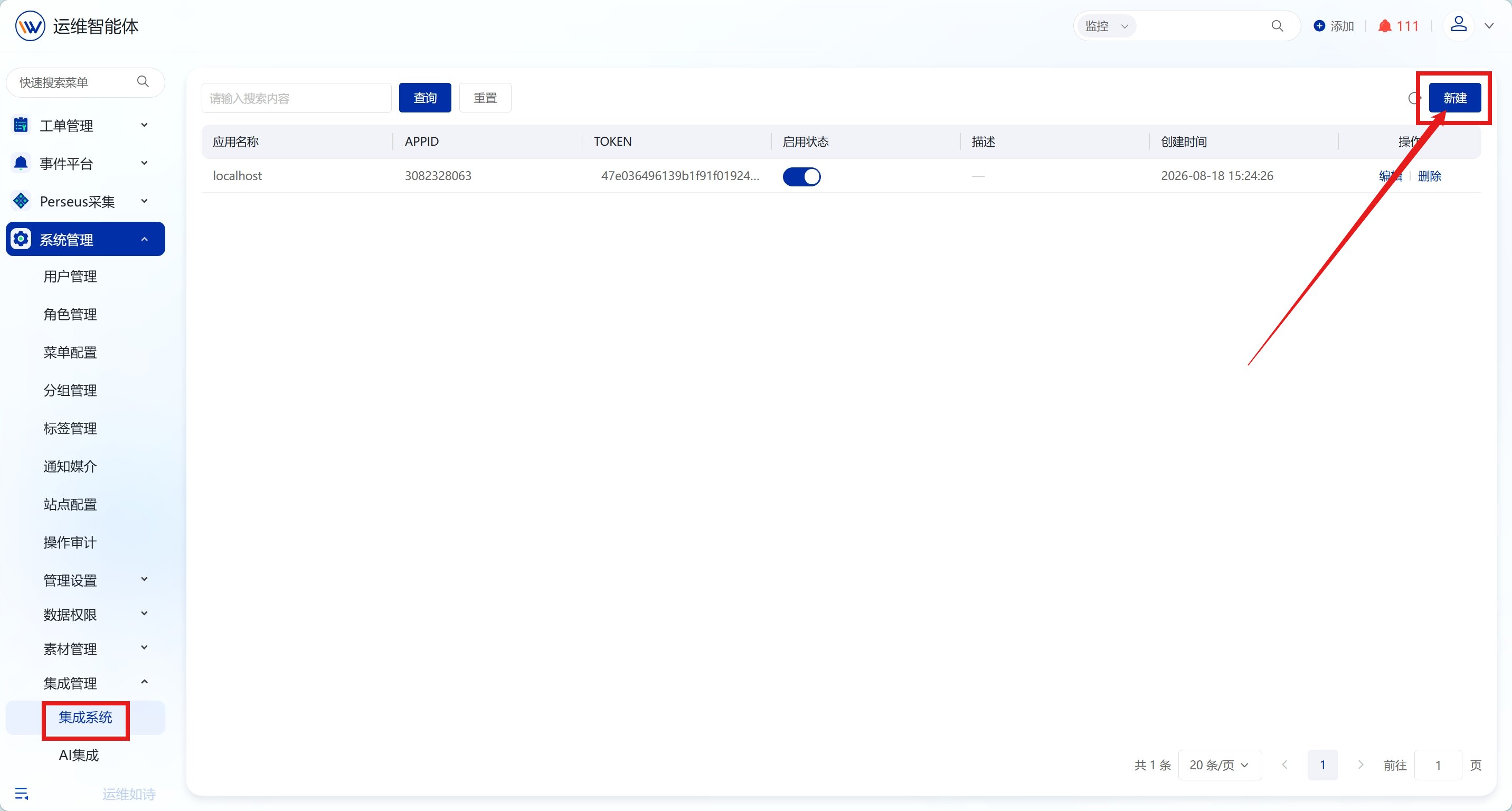
1，进入【系统管理】-【集成系统】页面，点击新建应用

<img src="https://mintcdn.com/lerwee/Xm4nAznWHmFsY_cF/images/sop-20260914/event-alert-dispatch-notification/event-alert-dispatch-notification-01-20260914.png?fit=max&auto=format&n=Xm4nAznWHmFsY_cF&q=85&s=1c723b818d2dd5e69c7b983ea9e2d6fc" alt="告警分派与通知 操作截图 1" width="2864" height="1536" data-path="images/sop-20260914/event-alert-dispatch-notification/event-alert-dispatch-notification-01-20260914.png" />

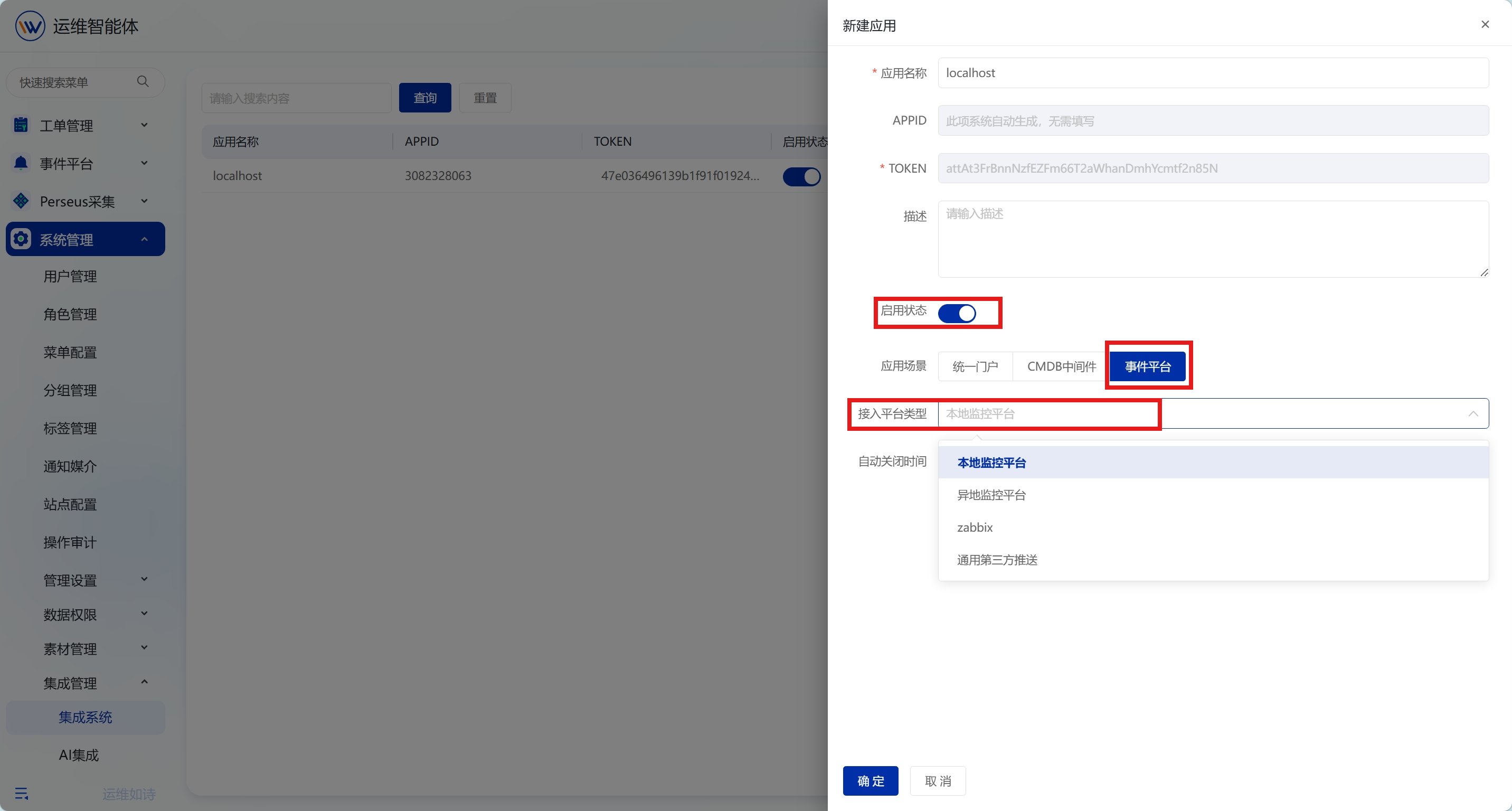
2，填写应用名称，开启应用状态，将应用场景切换为事件平台，选择接入平台类型并配置自动关闭时间，全部信息填写完成后点击保存。

* \*\*接入平台类型：\*\*支持本地监控平台、异地监控平台、通用第三方推送等。

* \*\*自动关闭时间：\*\*用于设置告警自动关闭时长（单位秒），留空永久不关闭，填N则告警生成N秒后自动关闭告警。

<img src="https://mintcdn.com/lerwee/Xm4nAznWHmFsY_cF/images/sop-20260914/event-alert-dispatch-notification/event-alert-dispatch-notification-02-20260914.png?fit=max&auto=format&n=Xm4nAznWHmFsY_cF&q=85&s=7b481155ffc8c1d2593248e4cfa2a603" alt="告警分派与通知 操作截图 2" width="2864" height="1536" data-path="images/sop-20260914/event-alert-dispatch-notification/event-alert-dispatch-notification-02-20260914.png" />

## 告警分派

### 概述

告警分派配置分派规则，可把不同告警归属到不同的用户（处理人），实现告警精准触达责任人，缩短响应时间。

### 操作步骤

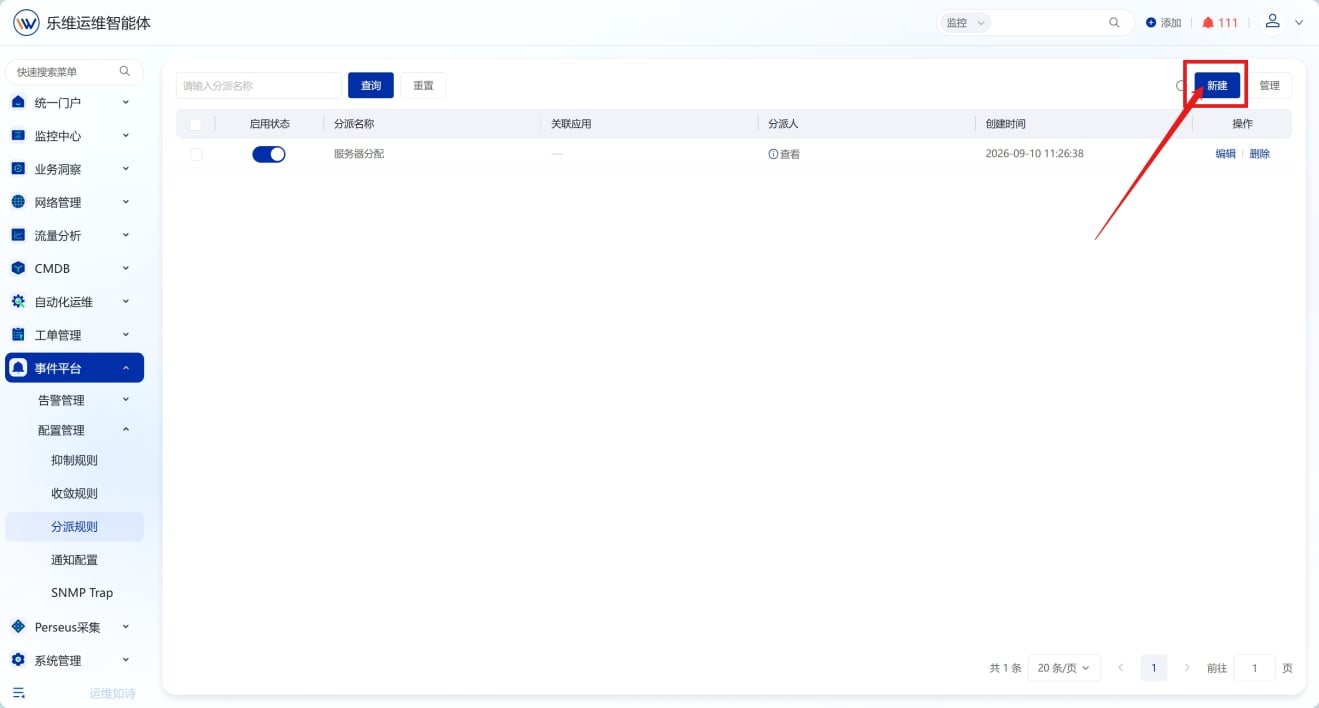
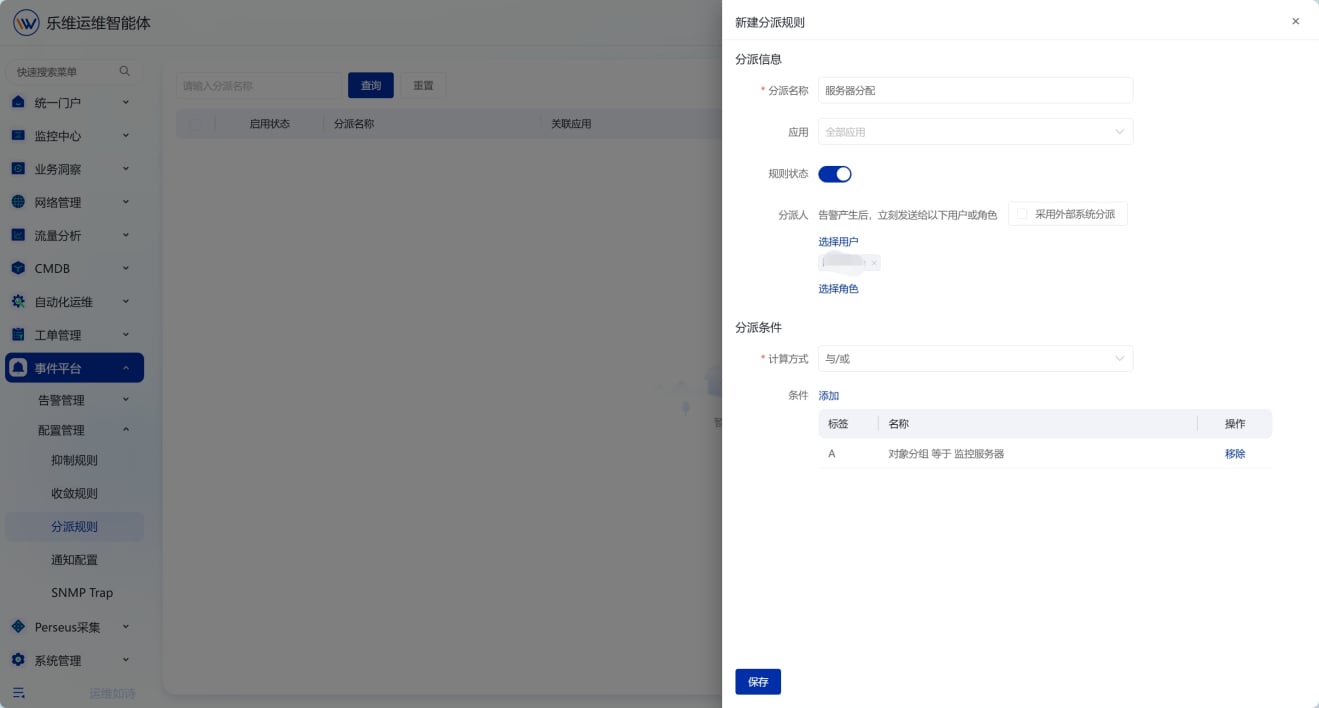
进入【事件平台】-【配置管理】-【分派规则】页面，点击新建创建分派规则，配置关联应用、分派人及分派条件。

* **应用**：选择告警来源，支持全部应用或指定第三方监控系统。

* \*\*分派人：\*\*勾选「采用外部系统分派」，将沿用监控中心用户角色权限分派；不勾选，则按自定义用户、角色分派。

* \*\*分派条件：\*\*配置条件逻辑，添加告警匹配条件，实现告警按规则自动分派。

<img src="https://mintcdn.com/lerwee/Xm4nAznWHmFsY_cF/images/sop-20260914/event-alert-dispatch-notification/event-alert-dispatch-notification-03-20260914.png?fit=max&auto=format&n=Xm4nAznWHmFsY_cF&q=85&s=ad0b068f4526b77033fd54e89c7bf4a1" alt="告警分派与通知 操作截图 3" width="1319" height="708" data-path="images/sop-20260914/event-alert-dispatch-notification/event-alert-dispatch-notification-03-20260914.png" />

<img src="https://mintcdn.com/lerwee/Xm4nAznWHmFsY_cF/images/sop-20260914/event-alert-dispatch-notification/event-alert-dispatch-notification-04-20260914.png?fit=max&auto=format&n=Xm4nAznWHmFsY_cF&q=85&s=d5a428b18b60f803d7402c794af7b57f" alt="告警分派与通知 操作截图 4" width="1319" height="708" data-path="images/sop-20260914/event-alert-dispatch-notification/event-alert-dispatch-notification-04-20260914.png" />

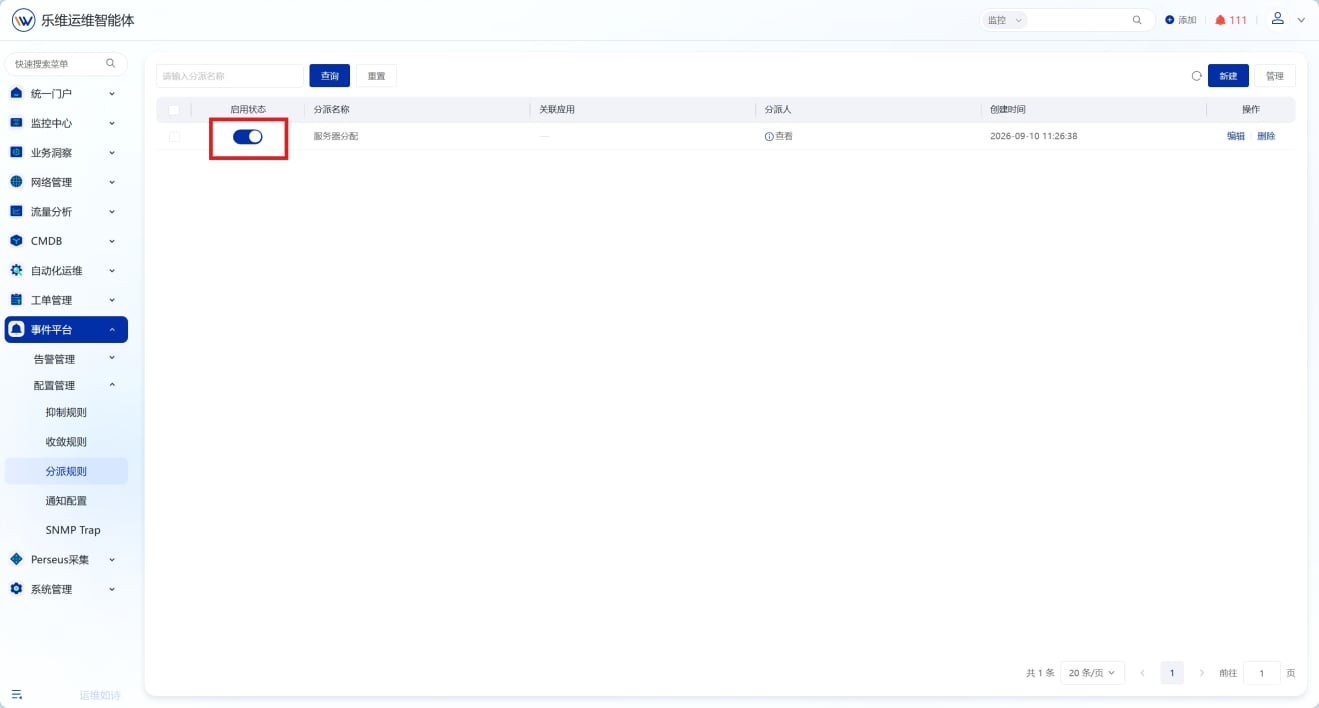
完成分配规则创建后，确保规则状态为启用

<img src="https://mintcdn.com/lerwee/Xm4nAznWHmFsY_cF/images/sop-20260914/event-alert-dispatch-notification/event-alert-dispatch-notification-05-20260914.png?fit=max&auto=format&n=Xm4nAznWHmFsY_cF&q=85&s=0af2f82eb1f6fb0fb08565c56f24d238" alt="告警分派与通知 操作截图 5" width="1319" height="708" data-path="images/sop-20260914/event-alert-dispatch-notification/event-alert-dispatch-notification-05-20260914.png" />

## 通知配置

### 概述

通知配置，用于定义告警产生后通过哪些渠道、发送给哪些人、发送什么内容，以及防止告警风暴的通知抑制机制。

### 操作步骤

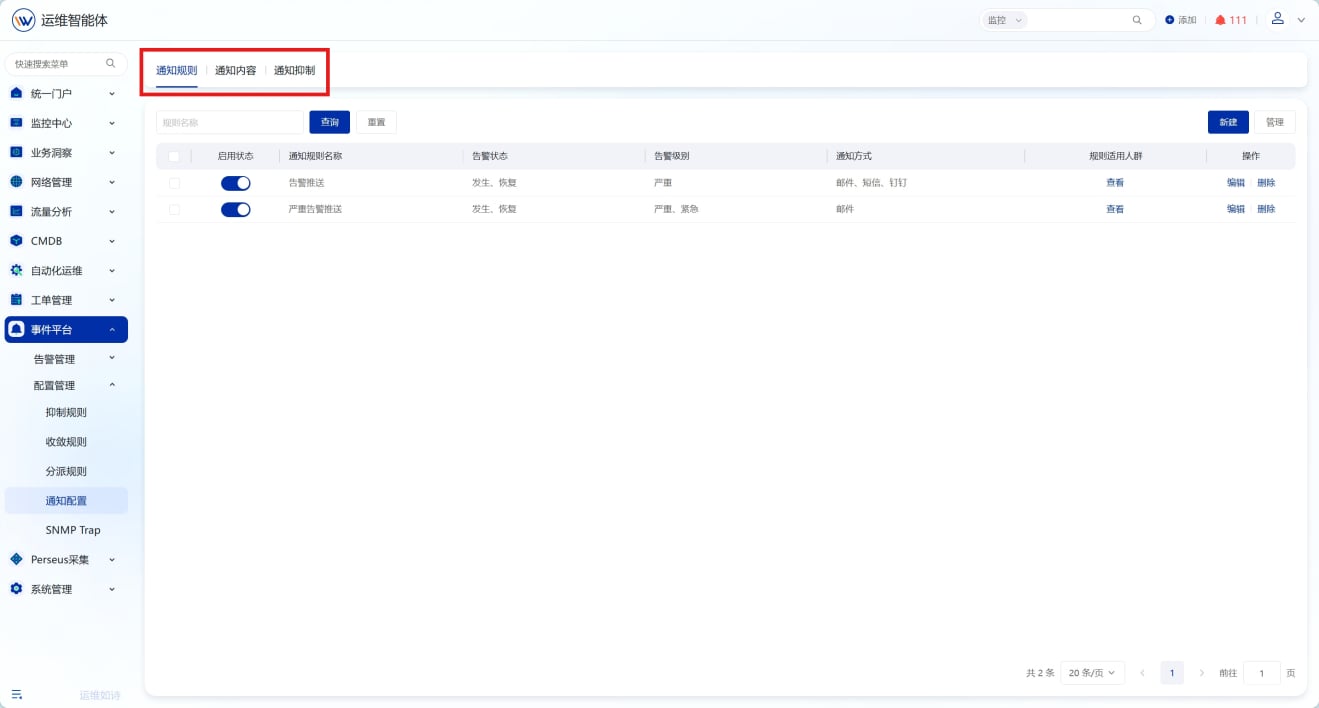
进入【事件平台】-【配置管理】-【通知配置】页面，模块包含通知规则、通知内容、通知抑制三个标签页，可分别完成对应告警通知相关配置。

<img src="https://mintcdn.com/lerwee/Xm4nAznWHmFsY_cF/images/sop-20260914/event-alert-dispatch-notification/event-alert-dispatch-notification-06-20260914.png?fit=max&auto=format&n=Xm4nAznWHmFsY_cF&q=85&s=83228da1597cd1a645d9dbd911ff7cb9" alt="告警分派与通知 操作截图 6" width="1319" height="708" data-path="images/sop-20260914/event-alert-dispatch-notification/event-alert-dispatch-notification-06-20260914.png" />

#### 通知规则

可基于告警状态（发生 / 恢复）、告警级别、约束条件等，配置通知方式与接收人员，实现告警消息定向推送。

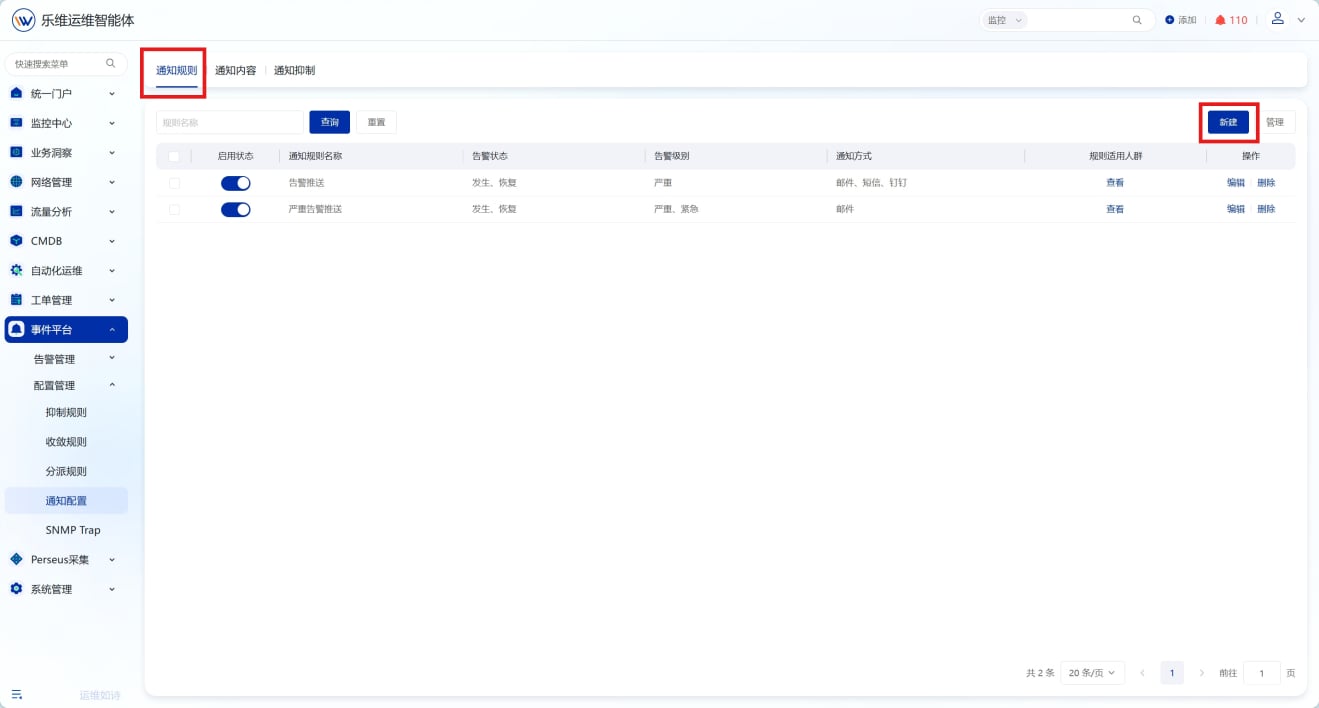
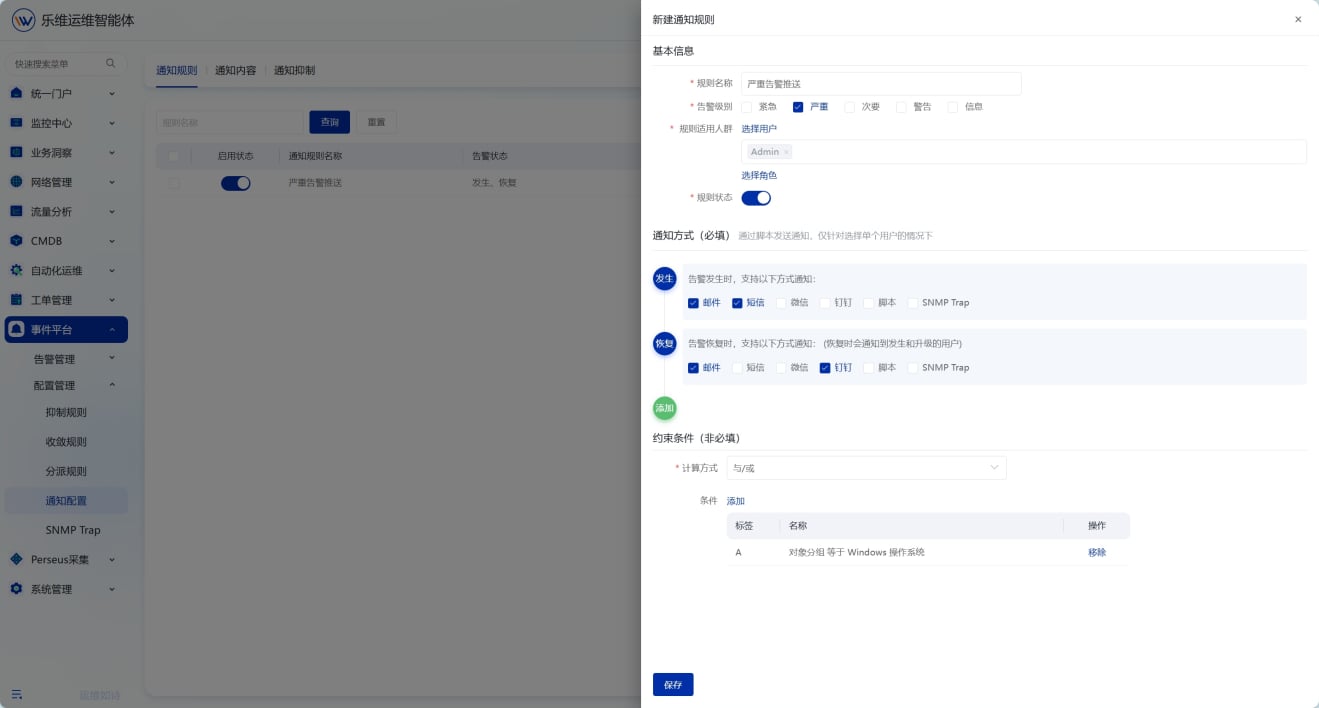
切换至通知规则页面，点击新建创建通知规则；填写规则名称，配置规则状态、告警级别、适用人群，分别设置告警发生、告警恢复对应的通知方式，按需添加约束条件，完成后保存。

<img src="https://mintcdn.com/lerwee/Xm4nAznWHmFsY_cF/images/sop-20260914/event-alert-dispatch-notification/event-alert-dispatch-notification-07-20260914.png?fit=max&auto=format&n=Xm4nAznWHmFsY_cF&q=85&s=e8274afa2ab898b4a2addcfa54cafe74" alt="告警分派与通知 操作截图 7" width="1319" height="708" data-path="images/sop-20260914/event-alert-dispatch-notification/event-alert-dispatch-notification-07-20260914.png" />

<img src="https://mintcdn.com/lerwee/Xm4nAznWHmFsY_cF/images/sop-20260914/event-alert-dispatch-notification/event-alert-dispatch-notification-08-20260914.png?fit=max&auto=format&n=Xm4nAznWHmFsY_cF&q=85&s=50cde453104c3b735212fb99e0ca6810" alt="告警分派与通知 操作截图 8" width="1319" height="708" data-path="images/sop-20260914/event-alert-dispatch-notification/event-alert-dispatch-notification-08-20260914.png" />

#### 通知内容

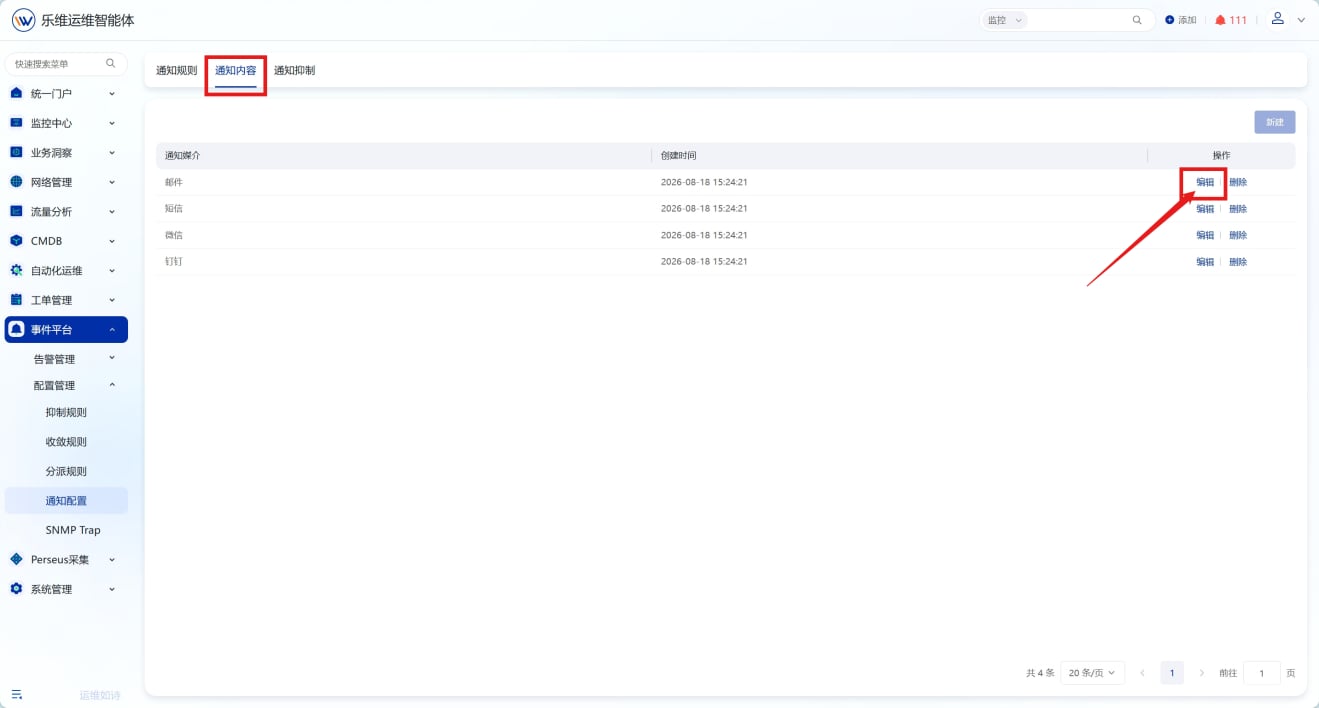
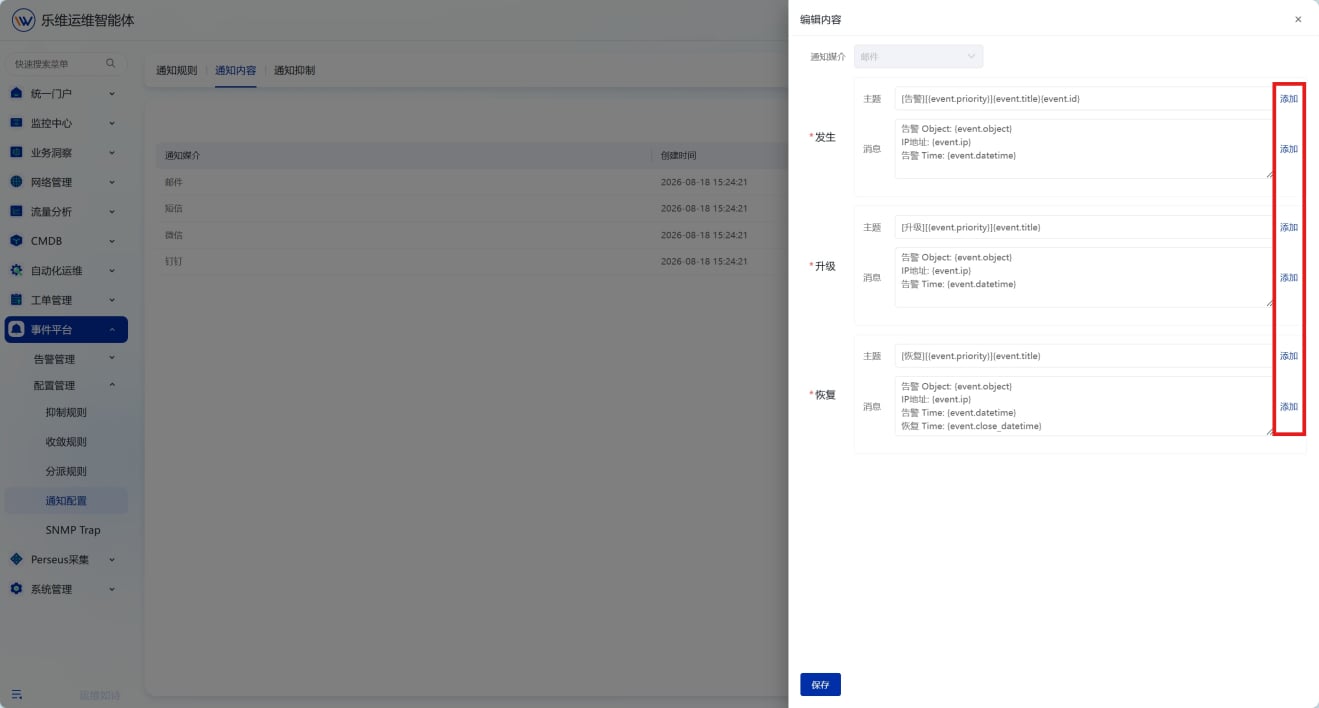
通知内容列表用于管理各类告警通知媒介对应的消息模板，可自定义告警发生、升级、恢复场景下的通知标题与正文，适配团队消息推送规范。

切换至通知内容页面，页面展示邮件、短信、微信、钉钉等通知媒介；选中已存在的媒介，点击编辑，修改对应场景下的通知模板内容。

<img src="https://mintcdn.com/lerwee/Xm4nAznWHmFsY_cF/images/sop-20260914/event-alert-dispatch-notification/event-alert-dispatch-notification-09-20260914.png?fit=max&auto=format&n=Xm4nAznWHmFsY_cF&q=85&s=9e7d9c806e32187008d53558abeadaee" alt="告警分派与通知 操作截图 9" width="1319" height="708" data-path="images/sop-20260914/event-alert-dispatch-notification/event-alert-dispatch-notification-09-20260914.png" />

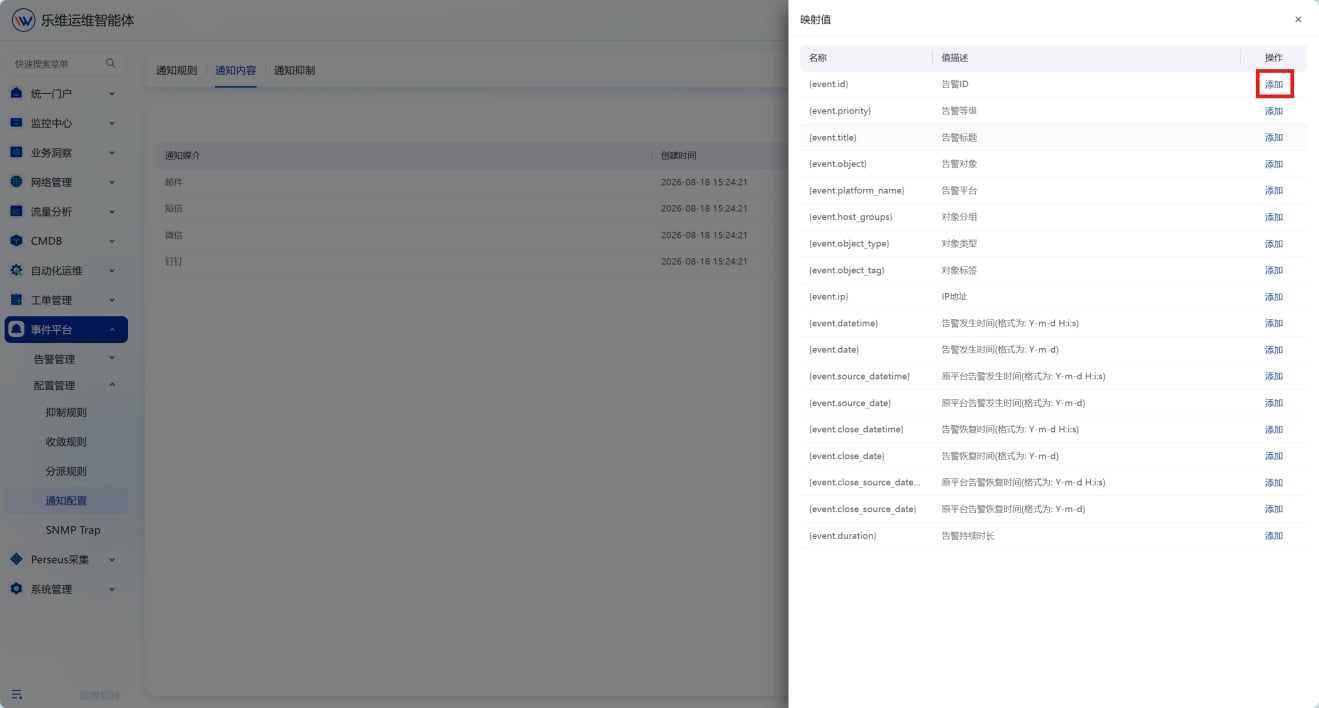
进入编辑内容弹窗，在发生 / 升级 / 恢复对应的主题、消息栏，点击添加唤起映射值列表；选择需要的告警变量插入模板，按需调整文本内容，全部编辑完成后点击保存。

<img src="https://mintcdn.com/lerwee/Xm4nAznWHmFsY_cF/images/sop-20260914/event-alert-dispatch-notification/event-alert-dispatch-notification-10-20260914.png?fit=max&auto=format&n=Xm4nAznWHmFsY_cF&q=85&s=98477eaa4cca6be1fc4de744d0ccd8d7" alt="告警分派与通知 操作截图 10" width="1319" height="708" data-path="images/sop-20260914/event-alert-dispatch-notification/event-alert-dispatch-notification-10-20260914.png" />

<img src="https://mintcdn.com/lerwee/Xm4nAznWHmFsY_cF/images/sop-20260914/event-alert-dispatch-notification/event-alert-dispatch-notification-11-20260914.png?fit=max&auto=format&n=Xm4nAznWHmFsY_cF&q=85&s=45b94b79d616c780fc8d66990391b7e8" alt="告警分派与通知 操作截图 11" width="1319" height="708" data-path="images/sop-20260914/event-alert-dispatch-notification/event-alert-dispatch-notification-11-20260914.png" />

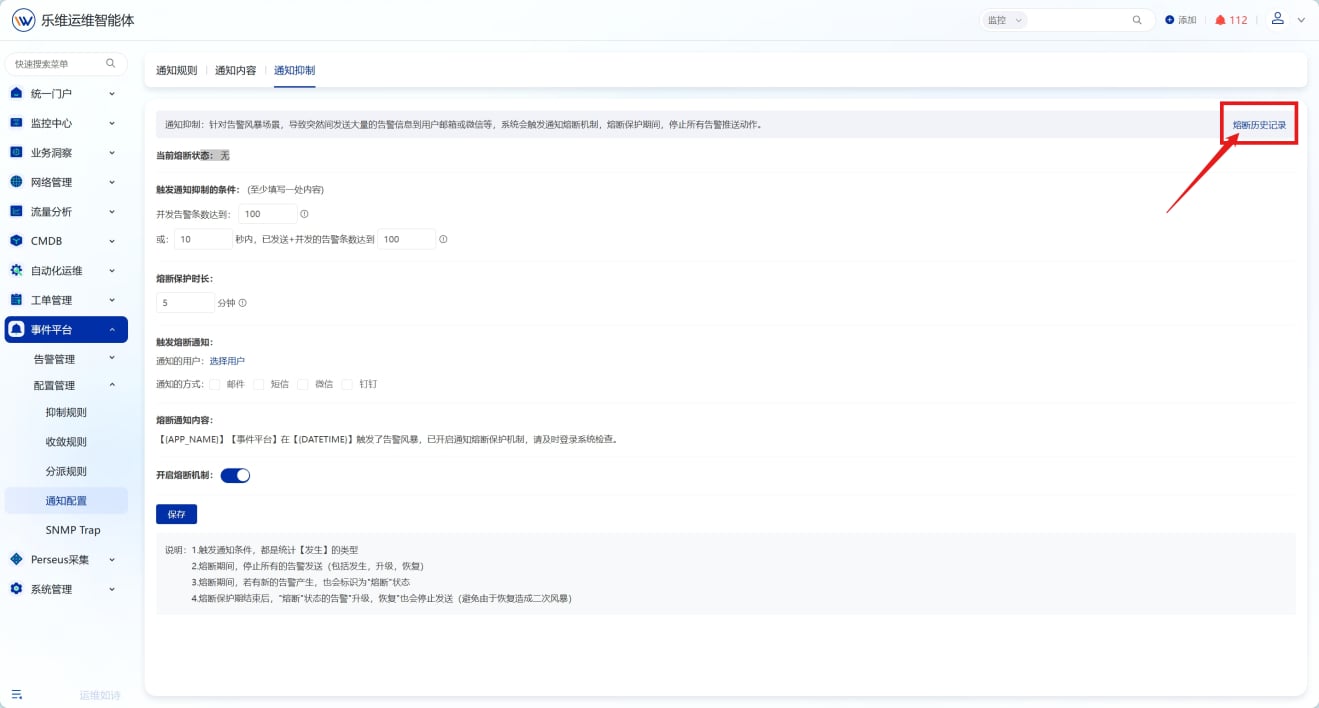
#### 通知抑制

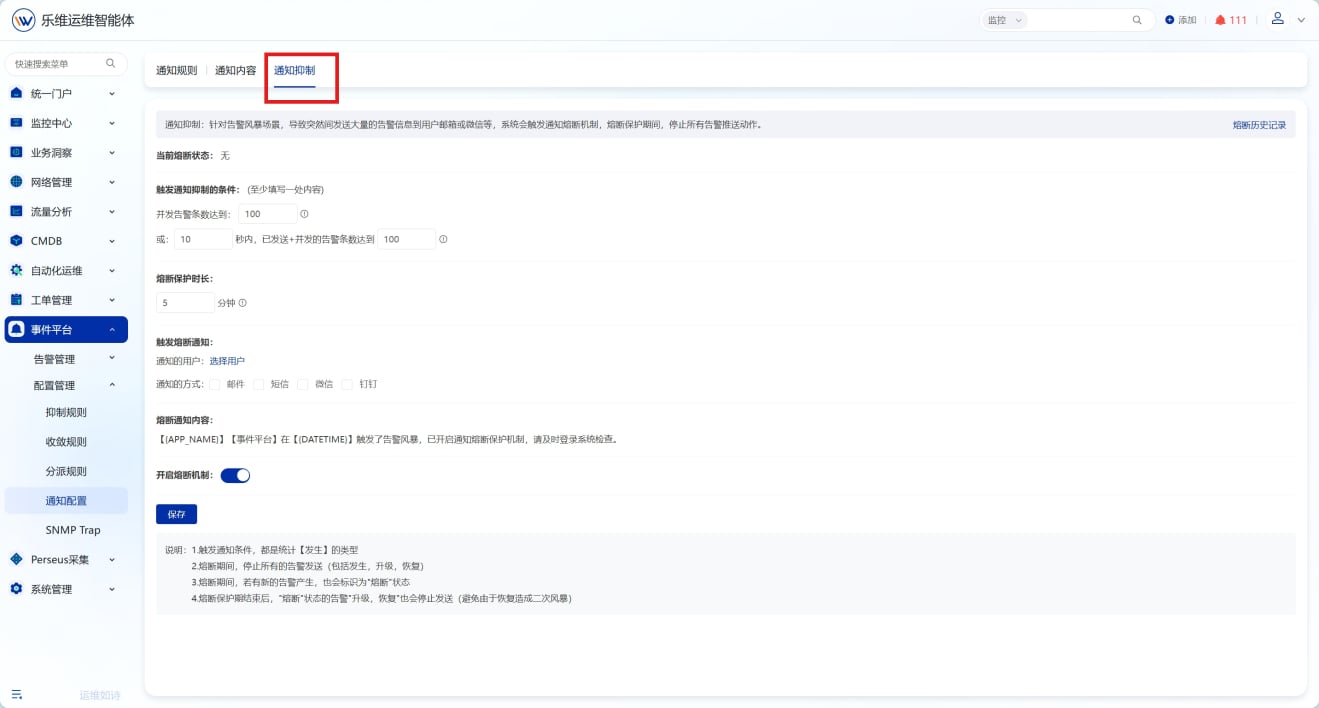
设置告警风暴时的熔断机制，避免短时间内大量通知淹没接收人。

切换至通知抑制页面，配置告警风暴触发条件、熔断保护时长、熔断通知接收人与通知方式，开启熔断机制后保存

<img src="https://mintcdn.com/lerwee/Xm4nAznWHmFsY_cF/images/sop-20260914/event-alert-dispatch-notification/event-alert-dispatch-notification-12-20260914.png?fit=max&auto=format&n=Xm4nAznWHmFsY_cF&q=85&s=0c25e747e69e4b7812b7870f50038c90" alt="告警分派与通知 操作截图 12" width="1319" height="708" data-path="images/sop-20260914/event-alert-dispatch-notification/event-alert-dispatch-notification-12-20260914.png" />

当出现通知抑制时，可通过查看熔断历史记录来查看熔断通知情况

<img src="https://mintcdn.com/lerwee/Xm4nAznWHmFsY_cF/images/sop-20260914/event-alert-dispatch-notification/event-alert-dispatch-notification-13-20260914.png?fit=max&auto=format&n=Xm4nAznWHmFsY_cF&q=85&s=b9345ca8b004c34c34f99ad6b9e46638" alt="告警分派与通知 操作截图 13" width="1319" height="708" data-path="images/sop-20260914/event-alert-dispatch-notification/event-alert-dispatch-notification-13-20260914.png" />